
Guide: Why Is My Google Business Not Showing Up in 2026?
How Much Do Google Ads Cost in 2025? A Complete Guide for UK Businesses
Benefits of Google Ads costs in 2025:
✅ Understanding cost factors for informed decisions
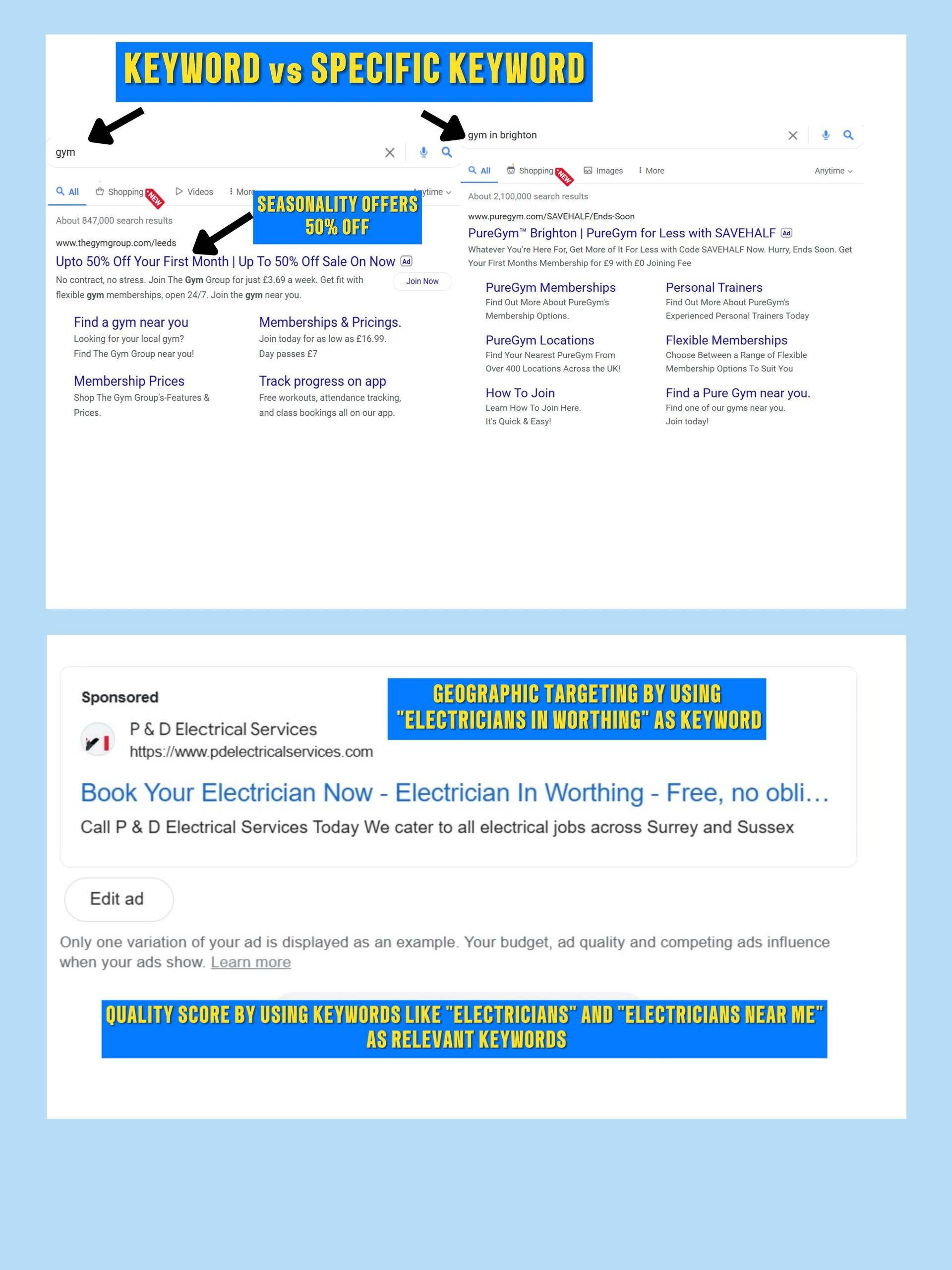
✅ Managing competition through targeted keywords
✅ Optimising Quality Score to lower costs
✅ Efficient geographic targeting for better cost control
✅ Adjusting for seasonality to make the most of peak times
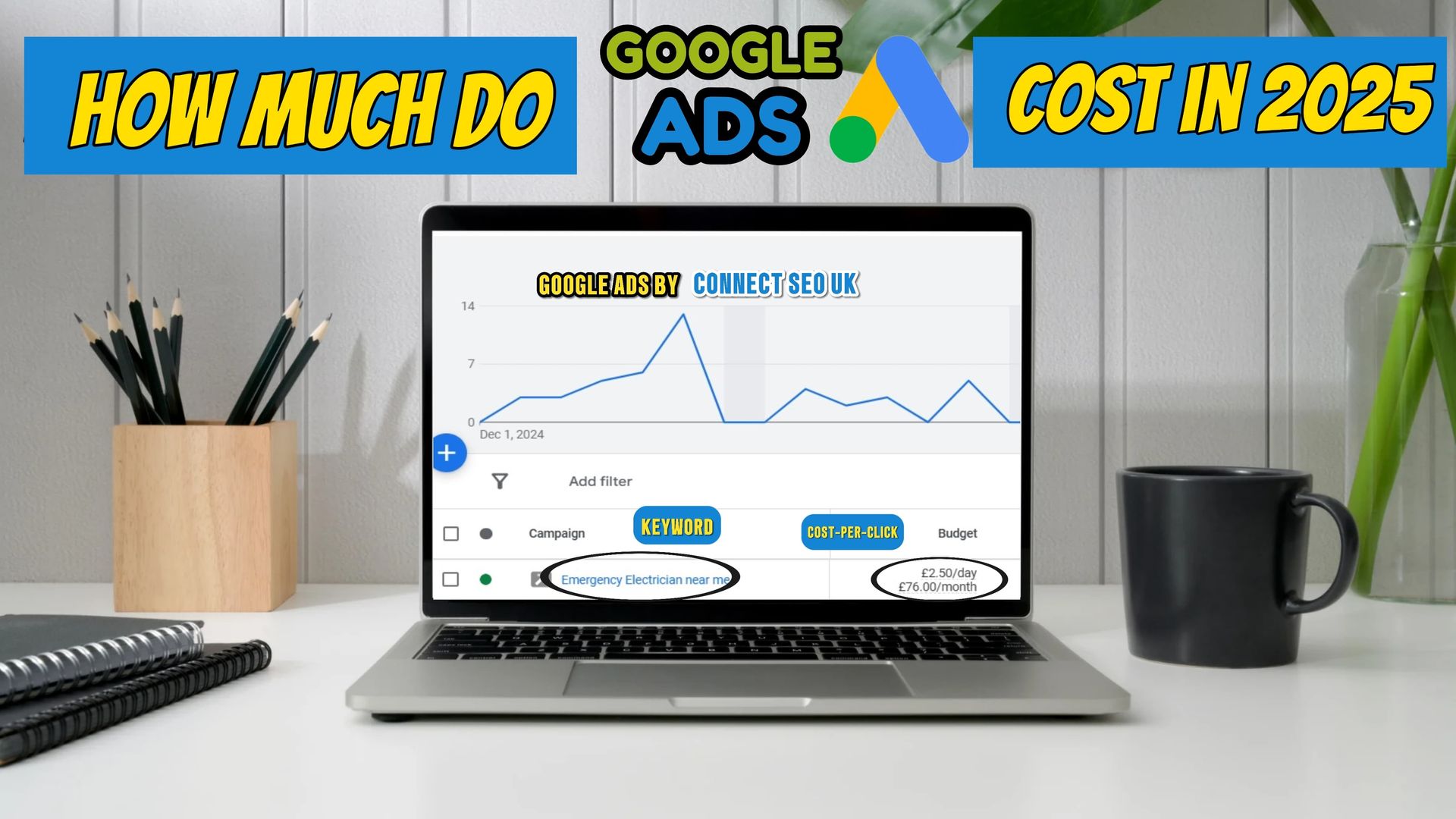
GET YOUR GOOGLE ADS DONE BY OUR PROFESSIONALS TODAY!
Contact Us
Table of Contents
- Introduction
- What Factors Determine Google Ads Pricing?
- Industry Competition
- Keyword Popularity
- Quality Score
- Geographic Targeting
- Seasonality
- How Is Your CPC Determined?
- Google Ads Pricing Models
- Additional Costs to Consider
- How to Build an Effective Google Ads Budget
- Emerging Trends in Google Ads for 2025
- FAQs About Google Ads
How Is Your CPC Determined?
Now that you know what factors impact the cost of Google Ads, let’s break down exactly how your CPC is determined. It all comes down to Google’s auction system, which works like a bidding process.
Here’s what happens:
- Your Maximum Bid: This is the highest amount you’re willing to pay for a click on your ad. But don’t worry—you won’t always pay that amount. Google charges you the amount necessary to beat the next highest bid.
- Ad Rank: This score combines your bid and Quality Score. The higher your Ad Rank, the better your ad placement—and the lower your cost per click.
- Competition: If many businesses are bidding for the same keywords, the CPC will naturally rise. Google aims to create a fair auction, but when demand is high, so are prices.
- Keyword Match Type: Broad match keywords tend to attract a larger audience but may result in less qualified traffic, which could lead to wasted spend. Exact match keywords are more specific, often leading to better results for your business—but they might cost more.
- Device Targeting: CPC can vary depending on the device—desktop, tablet, or mobile. People tend to search and click differently depending on what device they’re using, so you’ll want to adjust your bids accordingly.
Google Ads Pricing Models
Now, let’s take a look at the various pricing models Google Ads offers, so you can choose the one that works best for your goals.
Pay-Per-Click (PPC)
If you want to drive traffic to your website, this is the model for you. With PPC, you pay each time someone clicks on your ad. The costs can range from £0.70 to £15+ per click, depending on your industry and the competitiveness of your keywords.
Cost Per 1,000 Impressions (CPM)
If your goal is to get your brand in front of as many people as possible, the CPM model is a good choice. With this model, you pay for every 1,000 impressions your ad gets, rather than paying per click. The costs for CPM range between £1 and £5 per 1,000 impressions in the UK.
Cost Per Acquisition (CPA)
For businesses looking to generate specific actions, such as product purchases or sign-ups, the CPA model is the way to go. With CPA, you only pay when someone takes an action that you’ve defined—like filling out a contact form or making a purchase. The costs typically range between £20 and £60 per acquisition.
Additional Costs to Consider
Along with the basic CPC or CPM costs, there are other potential expenses you should factor into your Google Ads budget.
- Professional Management Fees: If you choose to hire an agency or a Google Ads expert to manage your campaigns, expect to pay anywhere from £200 to £1,000+ per month, depending on the complexity of the campaign.
- Landing Page Optimisation: Your landing page plays a key role in your Quality Score. The better it performs (i.e., user-friendly and relevant to the ad), the lower your CPC will be.
- Tracking and Analytics Tools: To get a deeper understanding of your campaign performance, consider investing in advanced analytics tools like Google Analytics 360, which may come with additional costs.
- Ad Extensions: Adding site links, call extensions, or structured snippets can boost your ad’s performance, but they may come with slight added costs.
How to Build an Effective Google Ads Budget
Knowing how much to spend on Google Ads can be challenging. However, with the right strategies, you can effectively manage your budget and get the most out of your campaigns.
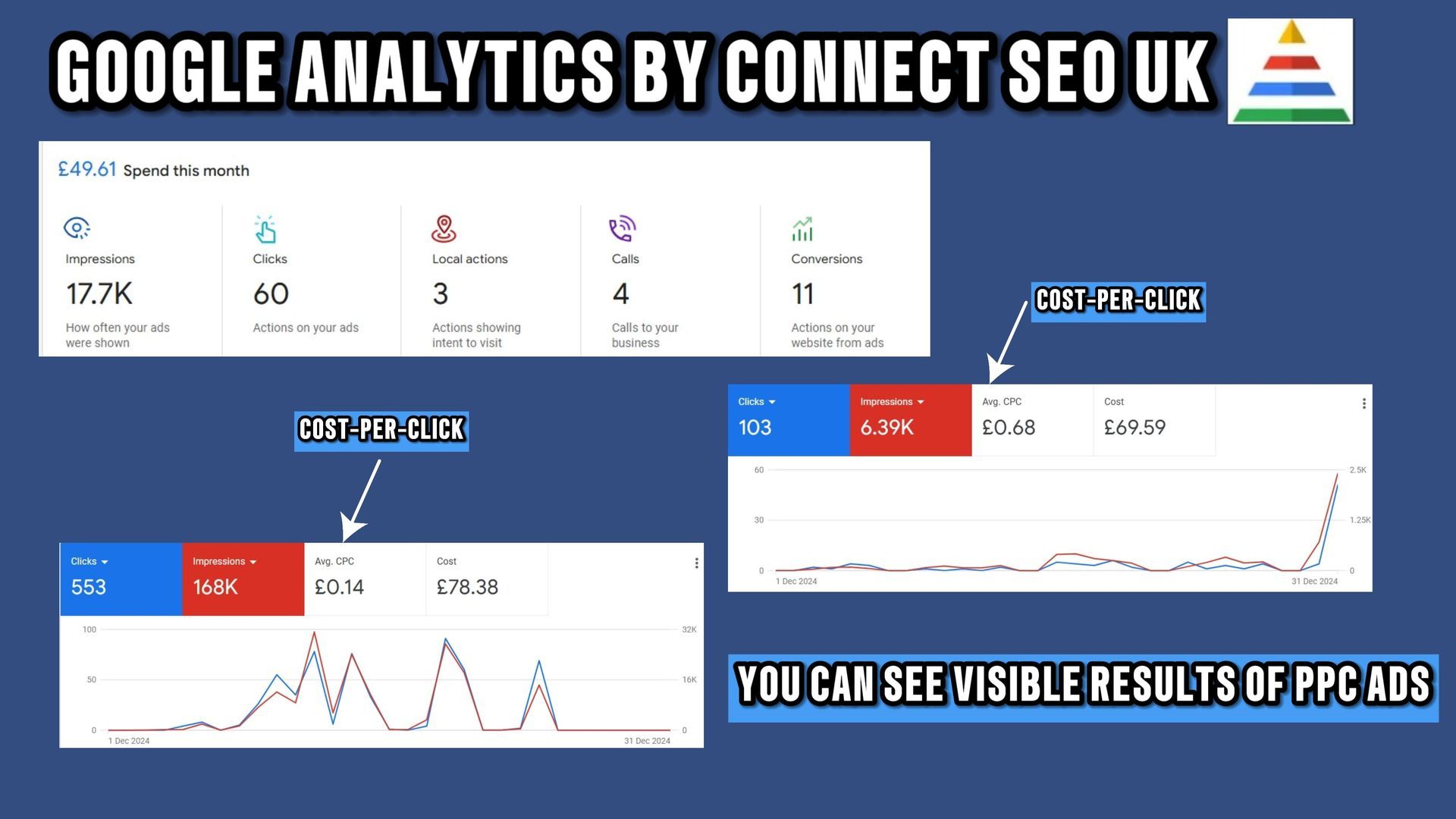
- Daily and Monthly Budgets: For example, if you're running a local bakery, a daily budget of £20 for a Google Ads campaign promoting “fresh pastries near me” might be sufficient. Larger businesses, like law firms, may allocate £2,000 or more monthly.
- Prioritising Campaigns: Focus more of your budget on high-performing campaigns. For example, if you're a retailer running a holiday sale, you may want to increase your budget during Christmas.
- Ad Scheduling: Schedule ads to show when your target audience is most likely to click. Restaurants could target lunchtime and dinner hours, for instance.
Emerging Trends in Google Ads for 2025
To stay ahead of the curve, it’s crucial to understand how the digital landscape is evolving. Here are some key trends you should watch for in 2025:
- AI-Powered Campaigns: With Google's AI and machine learning tools, ad targeting and optimisation are becoming more automated, improving the overall efficiency of campaigns.
- Privacy-First Advertising: With an increasing focus on data privacy, businesses must adjust their advertising strategies to work with first-party data and comply with regulations.
- Video Ads: Platforms like YouTube are becoming increasingly popular for video-based ads, especially with younger audiences.
FAQs About Google Ads
How do I know if my campaign is working?
You can measure success by tracking key metrics like CTR (click-through rate), conversion rate, and ROI (return on investment).
Are Google Ads suitable for small businesses?
Absolutely! Google Ads is flexible enough to suit businesses of any size, providing opportunities for small businesses to compete with larger players.
Need help budgeting your Google Ads?
Building a successful Google Ads campaign requires strategic planning and expertise. At Connect SEO UK, we specialise in creating tailored Google Ads strategies to drive traffic, leads, and conversions for your business.
Whether you’re new to Google Ads or looking to optimise an existing campaign, we can help!

Contact Us
If you want your business to stand out locally and online in 2026, a google business listing is absolutely essential. The world of local search is changing quickly, with Google rolling out new updates that directly affect how easily customers can discover you.
A fully optimised and verified Google Business Profile gives you a real edge. It means higher rankings, more leads, and greater trust from potential customers. Whether you’re new or want to get ahead, this guide will walk you step by step through setup, optimisation, verification, and expert tactics for mastering your online presence in 2026.
Understanding Google Business Listings in 2026
A google business listing is your shopfront on the world’s biggest search engine. It’s what people see when they search for your business or services near them. In 2026, this listing appears as a business card in both Google Search and Google Maps, showing your name, location, contact details, reviews, photos, and more.
The platform, now called Google Business Profile, has evolved from its earlier version, Google My Business. It gives you a central place to manage how your business appears across Google. Your listing includes essential info, customer reviews, photos, and even a Q&A section. This visibility helps potential customers decide if they want to visit, call, or make a booking.

What is a Google Business Listing?
A google business listing is a free tool provided by Google that lets business owners manage their online presence across Search and Maps. It acts as your digital business card, making it easy for customers to find your address, phone number, website, and opening hours.
The Google Business Profile integrates tightly with both Search and Maps, helping your business appear when customers search for products or services you offer. Over the years, Google My Business has transformed into the more robust Google Business Profile, offering more control and features.
Key elements shown on a google business listing include:
- Business name and description
- Address and map location
- Phone number and website
- Customer reviews and star rating
- Photos and videos
- Q&A and messaging features
For example, when someone searches for “coffee shop near me,” they might see your business card appear at the top of the results, complete with photos, ratings, and a “call now” button.
Why Google Listings Matter for Local SEO
Google dominates local search with over 90 percent of the market share, making a google business listing vital for any business wanting local visibility. When your listing is complete and optimised, you are more likely to appear in the coveted “local pack” at the top of search results, especially on mobile devices.
According to Google, businesses with a fully completed listing receive up to 70 percent more visits than those with missing information. This boost in visibility helps build trust with customers, as people are more likely to contact or visit a business they can easily find and verify online.
A well-managed google business listing also lets you stand out against competitors who may not have claimed or optimised their profiles. For more insights on why these listings are essential, see The Importance of Google Business Profile for Local Businesses.
Key Features of Google Business Listings in 2026
In 2026, a google business listing offers cutting-edge features to help you connect with customers. AI-powered messaging allows for instant replies and automated FAQs, making it easier to engage visitors at any time. Enhanced review management tools help you monitor and respond to feedback quickly, while real-time updates keep your information accurate.
Your google business listing is now fully integrated with Google Maps, Shopping, and new local ad formats, giving you more ways to reach potential customers. For example, service businesses are reporting more bookings thanks to the new messaging features that allow customers to ask questions and book appointments without leaving the listing.
Staying on top of these updates is crucial. Google regularly rolls out new features, and businesses that keep their listings fresh and fully optimised enjoy higher rankings, more leads, and increased customer trust. Make sure you review your google business listing often to take advantage of the latest improvements.
Step-by-Step: Creating and Claiming Your Google Business Listing
Claiming your spot on Google is a crucial move for any business aiming to grow in 2026. Let’s break down each step so your google business listing stands out, attracts more customers, and stays ahead of the competition.

Prerequisites and Preparation
Before you dive into creating your google business listing, make sure your business is eligible. You’ll need to be registered, have a physical location or defined service area, and be able to provide proof of your legal entity.
Gather these documents before starting:
- Official business address
- Phone number
- Proof of registration or legal entity
- Business email (not a personal one)
Accuracy is everything. Listings with incomplete or inconsistent details risk suspension, so double-check everything before moving forward. Many businesses face delays or suspensions simply because of small data mismatches.
Step 1: Setting Up Your Google Account
To begin your google business listing journey, either create a new Google Account for your business or select an existing one you trust. Once logged in, head over to the Google Business Profile Manager dashboard.
Security matters. Use a strong password and enable two-factor authentication to protect your account. If you need a detailed walk-through, How to Add Your Business to Google offers a helpful step-by-step guide.
Keeping login details secure ensures only authorised team members can manage your listing.
Step 2: Entering Business Information
Now, you’re ready to enter your business details. Start with your official business name, select the most accurate primary category, and write a clear, keyword-rich description. Don’t forget to add secondary categories for better targeting.
If your business serves areas beyond a storefront, specify each service area clearly. This helps customers in your region find you quickly and ensures your information is relevant to local searches.
Step 3: Adding Location, Contact, and Website Details
Next, add your business address and check the map pin placement for accuracy. Input your phone number, website, and any booking links you offer. Remember, a google business listing with missing or incorrect contact details can lose visibility and trust rapidly.
Here are key details to get right:
- Exact address and postcode
- Main phone number
- Website link
- Booking or appointment link (if relevant)
Mistakes here could mean missed opportunities, so review everything before submitting.
Step 4: Submitting and Claiming Your Listing
Once all your information is set, complete the setup and submit your google business listing for verification. If your business already appears on Google, claim the existing listing and resolve any duplicates. Follow the on-screen prompts to finalise your claim.
Most listings appear within days, but some may take longer depending on the verification method. Patience is key, but prompt action helps you get found by customers sooner.
Verifying Your Google Business Profile: Essential for Visibility
Verifying your google business listing is a crucial step for any business aiming to stand out locally in 2026. Without verification, your business may not appear in Google Maps or Search, which means potential customers simply cannot find you. A verified profile helps build trust, boosts your ranking, and places your business above competitors who have yet to complete this essential process.
Why Verification Matters
Let’s be honest, no one trusts a business that doesn’t show up where it matters. If your google business listing is not verified, it may not display in Google Maps or local search results. Even if it does, customers are far less likely to engage with an unverified profile.
Here’s why verification is vital:
- Your business gets priority placement in search results.
- Verified profiles are more likely to be chosen by customers.
- Competitors with verified listings will appear above you.
Studies show that verified businesses are twice as likely to be considered reputable. Imagine searching for a service and seeing your competitor front and centre simply because they completed their google business listing verification. It’s a small step with a huge impact.
Verification Methods in 2026
Google offers several ways to verify your google business listing in 2026, making it easier than ever for businesses of all types. The most common methods include postcard, phone call, email, live video, and Google Search Console. Your eligible options may vary depending on your business type and location.
Here’s a quick overview:
- Postcard: Google sends a code to your business address.
- Phone: Automated call or SMS with a verification code.
- Email: Simple email confirmation to your business account.
- Video: Live video call with a Google representative.
- Google Search Console: If your website is verified, this can fast-track the process.
If you encounter issues, such as not receiving a code or your google business listing being flagged, double-check your details for accuracy. Many problems stem from inconsistent information or missing documentation. Keeping everything up to date helps prevent most headaches.
Fast-Track Verification & Support with Connect SEO
At Connect SEO, we know how frustrating it can be to wait for your google business listing to go live. That’s why we offer a fast, professional verification service for UK businesses. Our experts handle the entire process, whether you need phone, email, or postcard verification.

We also provide ongoing support for any suspensions, flags, or listing issues that may crop up. With our service, businesses often see faster activation and less downtime. If you want to ensure your google business listing is visible and trusted by customers, let our team help you cut through the red tape and get found online.
Optimising Your Google Business Listing for Maximum Visibility
A fully optimised google business listing is the secret weapon for boosting your visibility in local search. By keeping every detail up to date and using the latest features, you can turn your listing into a magnet for new customers. Let’s explore the essential steps to make your profile stand out in 2026.

Completing and Updating All Listing Information
To unlock the true power of your google business listing, every field should be complete and accurate. This means listing your business hours, address, contact details, website, and relevant attributes. Make it a habit to review your profile regularly, especially before holidays or when you update services.
A business with a fully completed google business listing is 2.7 times more likely to be considered by customers. Even small changes, like updating special hours or adding a new phone number, can make a big difference. Double-check for inconsistencies—incorrect details can lower your ranking and erode trust.
Quick tips:
- Fill in every field, including accessibility and payment options.
- Update for holidays, temporary closures, or service changes.
- Check for typos or outdated info each month.
Adding High-Quality Photos and Videos
Photos and videos are the first impression many customers have of your business. A google business listing with fresh, high-quality visuals attracts more clicks and builds trust instantly. Google recommends at least three photos, but the more relevant, the better.
Types of media to add:

Update your google business listing with new images regularly. For example, a retailer who refreshed their photos saw a noticeable boost in foot traffic. Videos can also showcase your team or services in action, making your listing more engaging.
Leveraging Google Posts and Offers
Google Posts are a fantastic way to keep your audience engaged and informed. By sharing updates, promotions, or events directly on your google business listing, you stay top-of-mind and encourage action. Schedule regular posts to showcase new products, announce events, or highlight special offers.
Restaurants, for instance, have increased bookings by sharing weekly offers through their listing. Use eye-catching images and clear calls to action. Posts only last seven days, so keep content fresh and relevant.
Ideas for posts:
- Limited-time discounts
- Event announcements
- New menu items
- Customer testimonials
Managing Reviews and Building Reputation
Reviews are the heartbeat of your google business listing. Positive feedback boosts your ranking and attracts more customers, while prompt responses show you care. Encourage satisfied clients to leave reviews, and always respond—especially to negative ones.
Listings with more positive reviews consistently rank higher in local packs. Consider this: a service provider improved their average rating from 3.8 to 4.6 stars by actively engaging with reviewers. This not only built trust but also increased enquiries.
Review management checklist:
- Ask for feedback after every job or sale
- Respond to all reviews, good or bad
- Address negative feedback constructively
Using Q&A and Messaging Features
The Q&A and messaging features on your google business listing are powerful tools for real-time communication. Monitor questions regularly and provide clear, helpful answers to build trust. Enabling messaging lets customers reach you instantly—vital for converting leads.
AI-powered chatbots can assist with common queries, freeing up your time for more complex requests. Professional services often use messaging to answer questions and secure appointments on the spot. Make sure to set notifications so you never miss a message.
Best practices:
- Check Q&A weekly for new questions
- Use templates for common responses
- Enable messaging and reply promptly
Adding Products, Services, and Attributes
Listing detailed products, services, and attributes transforms your google business listing into a comprehensive resource. Add every product or service you offer, with descriptions and prices where possible. This helps you appear in more keyword searches and provides clarity for potential customers.
Attributes like “women-led” or “wheelchair accessible” can set you apart and influence customer decisions. The more detailed your listing, the easier it is for people to choose you over competitors.
Checklist:
- Add all products/services with details
- Update for seasonal items or new launches
- Select relevant attributes to stand out
Insights and Analytics: Measuring Performance
Your google business listing comes with built-in insights to help you track performance. Use these analytics to see how many people view your profile, call your business, request directions, or click your website. This data reveals which features drive the most engagement.
Regularly review your insights to spot trends. For example, if a spike in calls follows a new photo upload, keep adding fresh visuals. Adjust your strategy based on what works best. For more advanced optimization tips, see this Google Business Profile Optimization Guide 2025.
By making data-driven decisions, your google business listing will stay one step ahead of the competition, ensuring maximum visibility and impact.
Troubleshooting and Maintaining Your Google Listing
Keeping your google business listing in top shape is crucial for attracting customers and staying ahead of the competition. Even with the best setup, issues can pop up, so let’s explore how to keep your listing healthy, accurate, and visible.
Common Issues and Solutions
Sometimes, even a well-managed google business listing can face problems.
The most common ones include:
- Suspensions due to policy violations or inconsistent information.
- Duplicate or conflicting listings that confuse customers.
- Changes in address or ownership needing a careful update.
If your listing is suspended or flagged, don’t panic. Start by reviewing Google’s guidelines and correcting any errors. Always double-check business details match across platforms.
A real-world example: a local café lost visibility after moving addresses but quickly recovered by updating all details and verifying changes.
Keeping Information Accurate and Up to Date
Accuracy is the backbone of a trustworthy google business listing. Outdated or incorrect information can confuse customers and lower your rankings.
Set regular reminders to audit your listing, especially before holidays or after any big changes.
Check:
- Opening hours and special dates
- Contact numbers and email addresses
- Website and booking links
A missed update, like a wrong phone number, can mean lost leads and unhappy visitors. By staying proactive, you’ll boost customer trust and keep your profile competitive.
Managing User-Generated Content
Your google business listing is shaped by more than just your words. Customer reviews, photos, and public questions all contribute to your online reputation.
Monitor new reviews regularly and respond promptly, whether feedback is positive or negative. Use the flagging option for inappropriate content or spam. Don’t forget to answer questions in the Q&A section to show you care.
One business prevented misinformation from spreading by quickly responding to a misleading review and providing clear, helpful details.
Staying Compliant with Google’s Guidelines
Adhering to Google’s rules keeps your google business listing safe from penalties or removal.
Key areas to watch include:
- Avoiding prohibited content and fake reviews
- Not stuffing keywords in names or descriptions
- Respecting Google’s categories and attribute requirements
If you receive a warning or penalty, review the issue, correct it, and submit an appeal if needed. Staying informed and compliant means your listing remains visible and trusted by both Google and your customers.
Advanced Strategies to Boost Your Google Business Listing in 2026
Ready to take your google business listing to the next level in 2026? With new features, smarter tools, and more ways to connect with customers, now is the perfect time to get ahead. Let’s explore the most effective strategies to help your business shine online.
Leveraging New Google Features and AI Tools
The pace of change is picking up, and your google business listing can benefit from the latest advancements. In 2026, Google has rolled out AI-powered messaging, automated FAQs, and real-time booking integrations. Imagine offering instant answers through a chatbot, or letting customers book appointments straight from your listing.
Some of the newest features to look out for include:
- AI-driven review summaries
- Automated responses to common queries
- Real-time product inventory updates
- Virtual tours powered by AR
Local SEO Integration and Multi-Location Management
Integrating your google business listing with your website’s schema and other local directories helps Google understand and trust your information. This boosts your visibility in search results, especially for “near me” and voice searches.
For businesses with multiple locations, centralised management is a game changer. Tools now allow you to update hours, images, and posts for all branches from a single dashboard. Consistency is key — listings with matching details across locations rank higher and attract more visits.
Want to add a schema to your website? Here’s a quick example:

Reputation Management and Competitive Benchmarking
Your google business listing is a powerful reputation builder. In 2026, tools make it easy to monitor reviews, track ratings, and benchmark against competitors. Responding to every review, positive or negative, shows you value your customers.
Here’s a simple table to help you compare your performance:

Use analytics to spot trends and areas to improve. Outperforming rivals in reviews and ratings can win you more trust and leads.
Harnessing Google Maps and Local Ads
Optimising your google business listing for Google Maps ensures you show up when customers search “near me.” Add accurate locations, service areas, and make use of new ad formats like Local Service Ads for instant visibility.
Did you know that only verified business profiles can run Local Services Ads? For details, see Google's 2024 Ad Policy Changes. Targeted ads can double your leads, especially for trades and services.
Voice search is growing, so make sure your contact info and categories are up to date for the best results.
Building Authority with User-Generated Content
Encourage your customers to share photos, reviews, and stories on your google business listing. User-generated content acts as social proof, boosting trust and engagement.
Try featuring customer photos in Google Posts or responding to every Q&A. The more interactive your listing, the more likely people are to choose you over a competitor.
Ask your happy clients to post their experiences — it’s like word of mouth for the digital age.
Monitoring Trends and Algorithm Updates
Google updates its algorithms regularly, impacting how your google business listing ranks. Stay informed about changes, such as shifts in review weighting or new features that affect local search.
Set up alerts for updates, follow trusted SEO blogs, and adjust your strategy as needed. Businesses that adapt quickly maintain their top positions even after major updates.
Keep an eye on which features drive the most engagement and focus your efforts there.
Preparing for the Future of Local Search
Looking ahead, local search will become even more personalised and dynamic. Your google business listing will need to adapt to new technologies, changing consumer habits, and evolving search trends.
Stay agile by:
- Regularly updating your information
- Testing new features as they roll out
- Engaging with customers through every available channel
Remember, continuous optimisation keeps your business visible and competitive in the years to come.
We’ve covered a lot about getting your Google Business Listing set up and shining for 2026 but sometimes it’s just easier to let someone else handle the tricky parts isn’t it If you’d rather skip the hassle and feel confident your profile is fully verified and optimised you don’t have to do it alone We’re here to support you every step of the way from sorting out verification to keeping your listing up to date and visible to local customers If you’re ready for more leads and less stress
Contact connect SEO Today and let’s boost your business together












