
Step-By-Step Guide To Add A Business To Google Maps 2026
PPC For Electricians by Electricians
In a world where
digital marketing is the key to business growth, electricians often struggle to stand out in a crowded marketplace. Traditional marketing strategies no longer guarantee visibility, and in an industry where quick and timely services are in high demand, potential customers need to find you fast. This is where PPC marketing
comes into play.
Pay-per-click advertising, especially on platforms like
Google Ads, allows electricians to appear at the top of search results when local customers search for your services. It’s an instant, powerful tool for increasing bookings and revenue growth.
But how does PPC work specifically for electricians?
What makes it so effective, and how can you implement it to ensure your business stays ahead of the competition?
PPC for Electricians: Earn More Revenue With Electrician PPC Services
Electricians face intense competition in the marketplace, and clients trying to find reliable services.
PPC marketing is one of the fastest ways to get your business in front of those searching for electricians. A well-optimised
PPC agency
can help target the right keywords, so your ad appears at the top of
Google Ads search results. Whether residential or commercial services, using
Google Ads
can direct traffic to your website, bringing you more leads and increased bookings.

Key Benefits of Electrician PPC Services
PPC advertising ensures that your business is visible immediately, unlike SEO which takes time. Every time someone searches for "electricians near me" or similar queries, your Google advert will be right at the top.
With a pay-per-click campaign, you only pay when someone clicks on your ad, ensuring your budget is used efficiently.
By partnering with a professional PPC agency, electricians can ensure that campaigns are optimized for local targeting and lead generation.

How Does PPC Advertising Solve Electrical Marketing Challenges?

Electricians often face difficulty getting noticed in local search results due to tough competition.
PPC allows you to bypass this issue by positioning your business right where potential customers are looking for services—on the first page of Google. Through
Google Adwords and Google Ads, your Google advert can be fine-tuned to reach the right audience, ensuring that you're seen by the people who are ready to hire an electrician.

Tackling the Challenges with PPC
One of the biggest challenges electricians face is visibility. Traditional marketing methods may not offer the precision targeting required in the digital age. With
Google Ads, you can specifically target your service area, adjusting your advertising on
Google Ads to match where your potential customers are searching. Additionally, you can target the right time of day and demographic groups to optimize ad performance.
Google Adwords allows electricians to appear in front of customers exactly when they need services.
Electricians who utilize PPC effectively will see more traffic and conversions as their ads connect with customers at the right time.

Pay-Per-Click Advertising for Electricians
The core of
PPC marketing lies in paying for ads that target specific searches, made by customers. For electricians, this means appearing in the top results when someone searches for terms like
"local electrician," "emergency electrician,"
or
"electrical repair."
With Google AdWords, you can choose relevant keywords and create a pay-per-click campaign that drives traffic to your site or contact page.
How do Electricians Benefit from Google AdWords?
Electricians benefit from Google Ads by gaining instant visibility in their local area. When potential customers search for services, they’re more likely to click on the top listings, which PPC ensures. A well-run campaign by a PPC agency
not only ensures your
Google advert is seen, but also that it converts, bringing you more business.
Here’s how electricians gain from Google Ads:
Set daily or weekly budgets and control costs while maximizing exposure.

This targeted approach allows electricians to maximize their reach while keeping costs low. PPC offers great ROI because you're only charged for actual results — clicks that drive real business.
Contact Us
Advertising for Electrician Companies
Electrical companies, whether large or small, can benefit greatly from advertising with
Google Ads.
Whether you're a solo contractor or part of a larger firm, online visibility is key to securing jobs.
PPC marketing
gives you direct access to customers actively searching for electrical services, making it a highly targeted way to generate leads.
Why Online Advertising Matters for Electricians?
- Increased Visibility:
Appear at the top of search results for relevant terms like "local electrician" or "emergency electrician," ensuring potential customers find you when they need your services.
- Highly Targeted Leads:
With PPC marketing, you can directly reach individuals actively looking for electrical services, making it easier to convert leads into customers.
- Enhanced Brand Recognition:
Consistently appearing in search results boosts your brand’s presence in the local market, increasing trust and awareness.
2. Cost-Effective Advertising Strategy
The beauty of a
pay-per-click
campaign is that it allows you to control how much you spend and what you’re paying for. You can set daily budgets, target certain times of the day, and focus on specific areas or customer segments. Working with a
PPC agency
ensures your campaigns are fine-tuned for maximum efficiency and lead generation.
- Budget Control:
Set daily or monthly budgets to ensure you're only spending what’s necessary, making your ad spend more efficient.
- Custom Targeting:
Choose specific times of the day, locations, and demographics to ensure you’re reaching the right audience.
- Pay-Per-Click Efficiency:
With PPC, you only pay when a potential customer clicks on your ad, making it cost-effective advertising.
- Expert Campaign Optimization:
Partnering with a PPC agency ensures your campaigns are continuously optimized for the best possible results.
Partnering with a PPC agency can ensure that your campaigns are optimized for maximum efficiency, driving more leads while keeping costs in check.
Why PPC Campaig
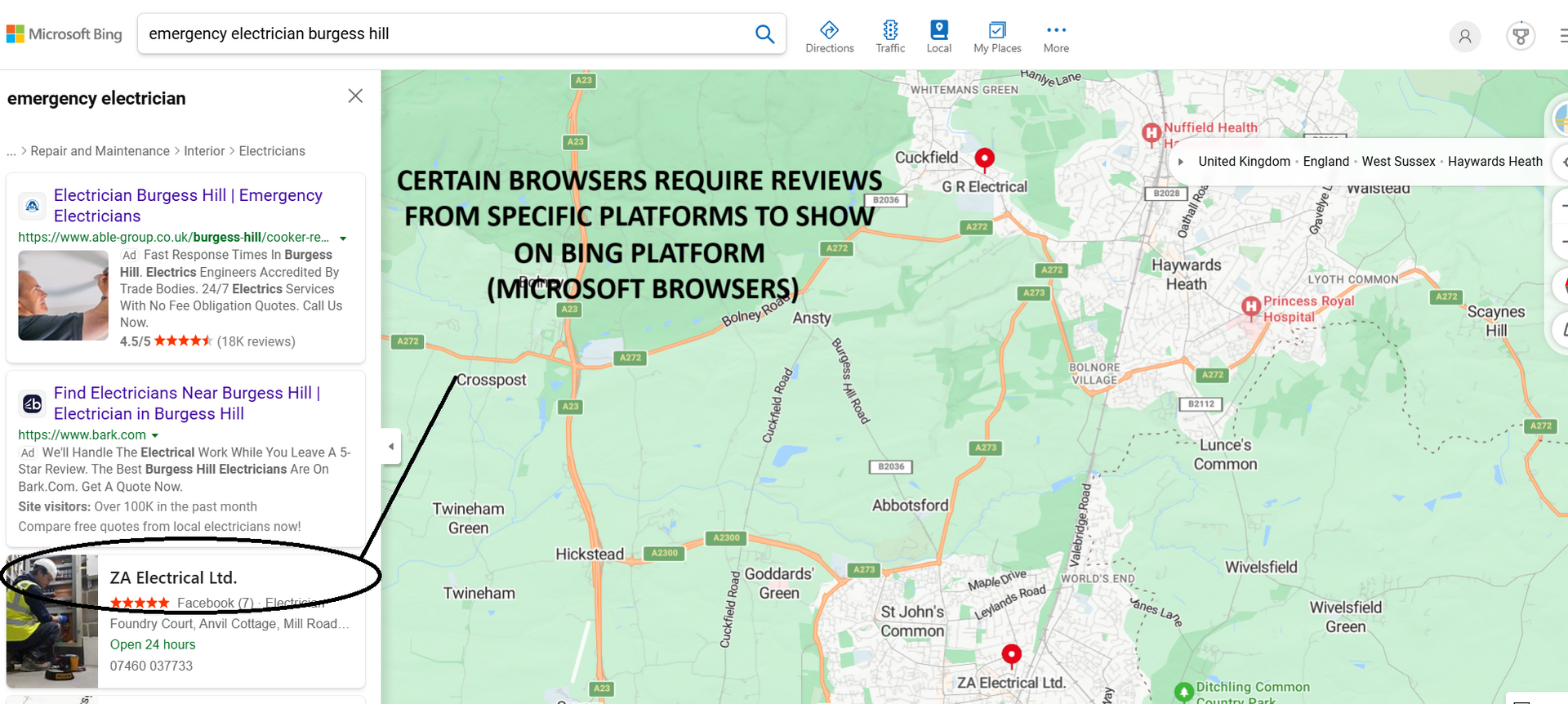
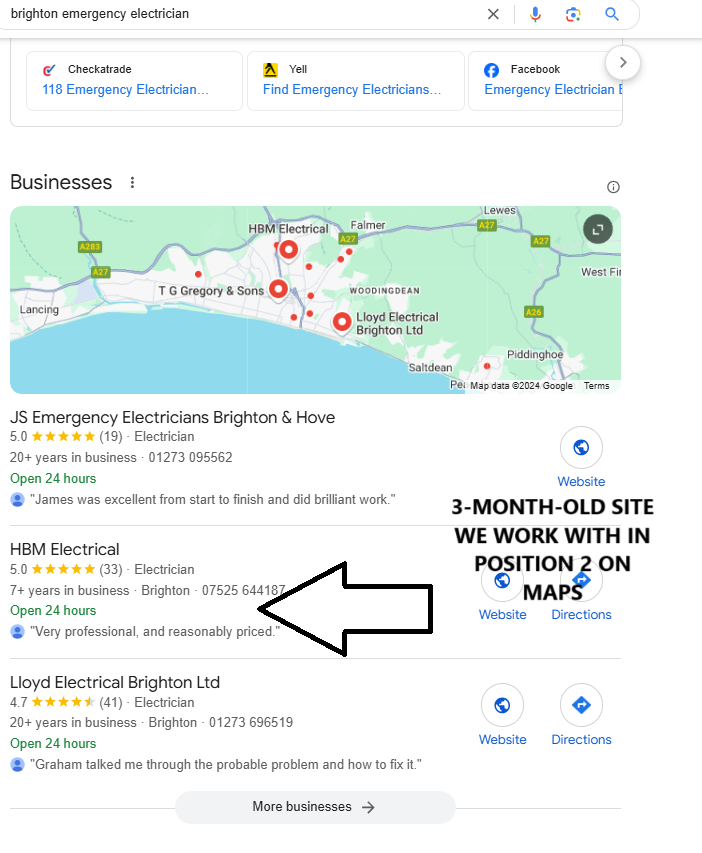
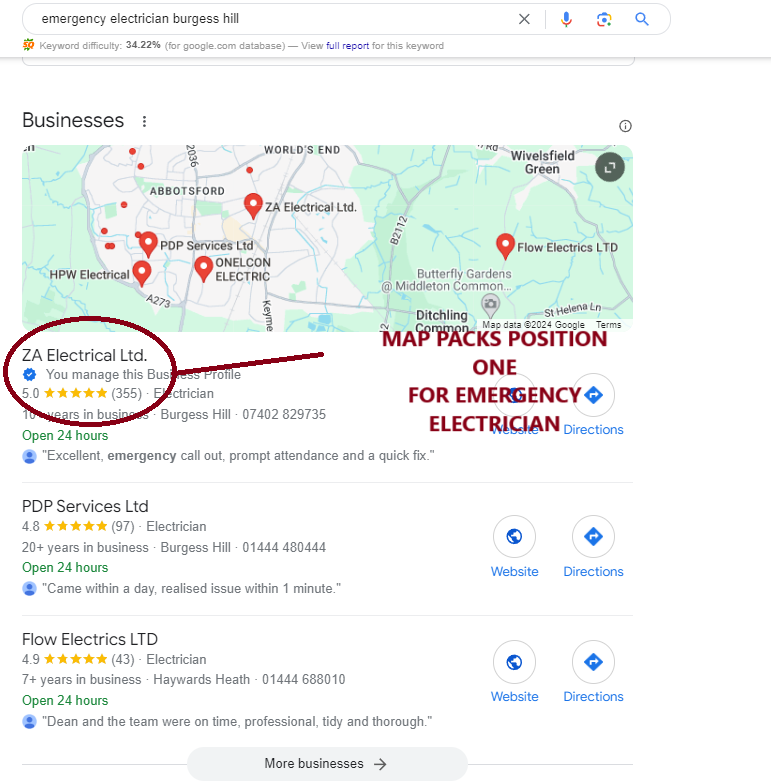
Imagine seeing your business pop up first when locals search nearby on Google Maps. With the right approach to your google business profile, you can become the go-to choice in your area.
We’ll walk together through every step, from setting up and verifying your profile to unlocking the latest features for 2026. You’ll discover practical ways to stand out, connect with your customers, and build lasting visibility.
Ready to make your mark in local search? Let’s get started and turn your google business profile into your most powerful local marketing tool.
Understanding Google Business Profile in 2026
Unlocking the full potential of your local business begins with understanding how the google business profile shapes your visibility in 2026. This section will guide you through what the platform is, why it matters, its latest features, evolving trends, and the real-world challenges businesses face. Let’s get started on building your local success story.

What is Google Business Profile?
The google business profile is a free tool from Google that lets any business, big or small, manage how they appear in Google Search and Maps. Originally known as Google My Business, it has evolved to offer more ways for shops, restaurants, and service providers to connect with local customers. A google business profile helps your business show up when people search for services nearby. For example, a coffee shop or plumber can stand out with accurate info and engaging photos, making it easier for customers to choose them.
Why Google Business Profile Matters for Local SEO
Your google business profile is one of the most powerful assets for local SEO. Verified profiles appear higher in local search results, giving you an edge over competitors. Trust signals like the verified badge and positive reviews boost customer confidence. According to Google, verified businesses can get up to 70% more visits from discovery searches. If you want to dive deeper into why this matters, see our
Importance of Google Business Profile for local businesses guide. Businesses with unverified listings often miss out on clicks and calls, while verified profiles stand out and attract more customers.
Key Features and Updates for 2026
The google business profile in 2026 comes packed with new features designed to help you shine. Businesses can now highlight sustainability and accessibility attributes, making it easier to attract conscious customers. Integration with Google Ads, Merchant Center, and Analytics offers seamless marketing and tracking. Enhanced messaging and booking options allow for direct customer engagement. AI-powered suggestions keep your profile fresh, with automated photo updates and performance insights. For example, your profile can now recommend trending services or update images automatically based on customer feedback.
The Local Search Landscape: Trends & Consumer Behaviour
The way people use the google business profile continues to evolve. “Near me” and voice searches are on the rise, reflecting the mobile-first habits of today’s customers. Did you know over 80% of consumers use Google to find local info? Visual search is also becoming more popular, putting your profile photos front and centre. Reviews and real-time updates play a crucial role in customer decisions, making it vital to keep your google business profile current and engaging.
Common Challenges Businesses Face
While the google business profile offers huge benefits, businesses can face some hurdles. Verification can be tricky, with postcard delays or suspended profiles causing frustration. Incomplete or inconsistent information leads to lost opportunities. Negative reviews and reputation management require ongoing attention. Keeping up with changing features is a challenge, too. For example, businesses with outdated hours or missing photos risk being overlooked by potential customers. Staying proactive with your google business profile helps you avoid these pitfalls and maximise your local reach.
Step-by-Step: Setting Up & Verifying Your Google Business Profile
Setting up your google business profile is the first step to unlocking local visibility and attracting new customers. Whether you are a tradesperson, retailer, or service provider, a well-crafted profile ensures potential clients find and trust you. Let’s walk through each stage, from creating your profile to avoiding the most common mistakes.
Creating Your Profile: The Essentials
Getting started with your google business profile is simple, but accuracy is key. Begin by signing up with your Google account. Choose the correct business category that fits what you offer, as this helps you appear in relevant local searches. Enter your business name, address, and phone number carefully, making sure your details match across all platforms.
Decide if you have a physical location customers visit, or if you serve clients at their location. For service-area businesses, add the areas you cover instead of a storefront address. For example, a plumber might list several nearby towns, while a shop lists its street address.
- Sign up with Google account
- Select accurate business category
- Enter precise name, address, and phone number
- Specify service area or physical location
A complete and correct google business profile foundation sets you up for local search success.
Verification: Why It Matters & How to Do It Right
Verification is the step that makes your google business profile visible and trustworthy. Without it, your business might not appear in Google Maps, and customers may hesitate to contact you. Verified profiles also show up above competitors who have not completed this step.
There are several ways to verify: by postcard, phone, email, instant verification, or video. If you run into issues, such as not receiving a code or facing a suspended profile, check your details for accuracy and try again. Unverified businesses are 50% less likely to appear in Maps, so it's worth getting right.
- Postcard: Most common, sent to your address
- Phone or email: Available for some businesses
- Instant or video: For eligible accounts
Take your time to verify your google business profile and gain a competitive edge.
Google Business Profile Verification with Connect SEO
At Connect SEO, we know that verifying your google business profile can sometimes be confusing or time-consuming. That is why our team offers a professional verification service for UK businesses. We take care of everything, whether you need phone, email, or postcard verification.

We also optimize your profile with high-quality photos, service listings, opening hours, and a compelling business description. If you ever face suspensions or flags, our ongoing support helps you get back on track quickly. Our service is trusted by local businesses and was founded by a tradesman who understands your needs.
Choose Connect SEO for a hassle-free google business profile experience and get noticed by more local customers.
Completing Your Profile for Maximum Impact
An optimised google business profile attracts more customers and builds trust. Fill in your business hours, website, and all contact options. Upload a sharp logo, cover photo, and images of your premises, products, or services. Select attributes that reflect your business, like "women-owned" or "LGBTQ+ friendly".
Complete profiles are proven to get more clicks and calls. If you want expert guidance, check out these Google Business Profile management tips to keep your information fresh and engaging.
- Add business hours and contact info
- Upload quality images and logo
- Choose all relevant attributes
With a full and current google business profile, you stand out in crowded search results.
Managing Multiple Locations or Service Areas
If your business has more than one location, google business profile makes it easy to manage them all. Use bulk uploads for franchises or chains, and organise your locations with groups and manager accounts. Consistency is crucial, so make sure each profile has the same branding, categories, and up-to-date information.
For example, a restaurant group with several sites can keep menus, photos, and opening hours aligned across all branches. Service-area businesses can list every area they serve to broaden their reach.
- Bulk upload for many locations
- Use location groups and managers
- Keep branding and info consistent
A well-managed google business profile presence builds trust with customers everywhere you operate.
Avoiding Common Setup Mistakes
Even small errors in your google business profile can lead to missed opportunities. Avoid creating duplicate listings, as these can confuse customers and even lead to suspension. Never add unnecessary keywords to your business name, since this goes against Google’s guidelines. Always keep your name, address, and phone number identical across all websites and directories.
Here is a quick checklist to help you stay compliant:
- Check for duplicate listings before creating a new one
- Use your real business name, not extra keywords
- Keep contact details consistent everywhere

By sidestepping these pitfalls, your google business profile will stay visible and trustworthy, helping you connect with more local customers.
Optimising Your Google Business Profile for Local Visibility
Optimising your google business profile is the key to standing out in local search. When your profile shines, you attract more customers, earn trust, and boost your chances of showing up at the top of Google Maps. Let’s explore step-by-step strategies to make your profile irresistible in 2026.

Crafting an Effective Business Description
Your business description is your first impression. Use it to highlight what makes your business unique, and weave in relevant keywords naturally. Imagine you’re talking directly to your customer, sharing your story and what you offer.
For example, a plumbing service might write, “We’re your trusted local plumbers in Manchester, providing 24/7 emergency repairs and friendly service across Didsbury and Chorlton.” Mentioning neighbourhoods and specialties boosts your google business profile visibility in location-based searches.
Selecting the Right Categories & Attributes
Choosing the correct categories and attributes ensures your google business profile appears in the searches that matter most. Start with the most accurate primary category, then add secondary ones that describe all your services. For instance, a restaurant could select “Italian Restaurant” as primary, and “Pizza Restaurant” or “Vegan Restaurant” as secondary.
Attributes set your business apart. In 2026, you can add tags for sustainability, accessibility, or dietary options like vegan or gluten-free. These details make your profile more appealing and inclusive, helping you connect with a wider audience.
Uploading High-Quality Photos & Videos
Visuals are crucial for your google business profile. High-quality photos and videos showcase your space, products, and team, building trust with potential customers. Make sure to upload a mix of exterior, interior, staff, and product shots. 360° tours are a fantastic way to give customers a feel for your business before they visit.
Regular updates keep your profile fresh. Did you know businesses with photos receive 42 percent more requests for directions? Try to update your visuals every month, and include before-and-after shots if you offer services like renovations or cleaning.
Managing and Showcasing Reviews
Reviews are the heartbeat of your google business profile. Encourage your happy customers to leave reviews, and always respond to feedback—positive or negative. Thanking customers for praise shows you care, and addressing concerns demonstrates professionalism.
Use a simple template for replies, for example, “Thank you for your feedback, we’re glad you enjoyed our service!” Reviews boost your profile’s trustworthiness, influence local rankings, and help new customers choose you with confidence.
Using Posts, Offers, and Events
Keep your google business profile buzzing with regular updates. Posts are perfect for sharing news, promotions, and events. Each post can include a call-to-action like Book, Call, or Learn More, making it easy for customers to engage.
If you run a restaurant, share your weekly menu or special deals. Retailers can announce sales or new arrivals. Data shows that active posting can increase engagement and calls by up to 20 percent. Stay active and keep your audience coming back for more.
Monitoring Insights & Analytics
Google provides valuable insights on your google business profile performance. Check your dashboard regularly to see how customers find you, whether through search or maps, and what actions they take—calls, visits, or website clicks.
Use this data to refine your strategy. For example, if one photo gets more views, upload similar images. If posts about offers get the most clicks, make them a regular feature. Analysing insights helps you focus on what works and keep improving your local presence.
Advanced Strategies for Engagement and Conversion
Want to turn your google business profile into a customer magnet? Here’s where we take things to the next level. By embracing advanced strategies, you can connect with more customers, boost engagement, and drive real conversions. Let’s explore how to unlock the full potential of your google business profile in 2026.

Messaging, Bookings, and Q&A
Direct communication is at the heart of every successful google business profile. Enabling messaging lets customers reach out instantly with questions, helping you build trust and win bookings. Integrate booking tools for appointments or reservations, streamlining the customer journey.
Don’t forget the Q&A section. Proactive management means answering questions quickly and honestly. For example, a salon might use instant messaging to confirm appointments while keeping the Q&A updated with popular queries like “Do you offer walk-ins?” or “What brands do you use?”
- Enable messaging for quick responses
- Add a booking button for instant reservations
- Regularly check and update your Q&A
This approach makes your google business profile a real-time customer service hub.
Leveraging Google Ads & Merchant Center Integration
Want your google business profile to do more than just show up? Link it with Google Ads for Local Services Ads, making your business appear in sponsored results when locals search for your services. Retailers can connect the Merchant Center to display in-stock products right on Maps, driving more visits and sales.
For example, a hardware shop could list their available products directly from their google business profile, so customers know what’s in stock before visiting. Make sure you:
- Connect your profile with Google Ads for more reach
- Sync Merchant Center to showcase real-time inventory
- Monitor campaign performance for best results
By integrating these tools, your google business profile becomes a powerful sales engine.
Harnessing New AI and Automation Features
AI and automation are transforming how you manage your google business profile. In 2026, expect smart suggestions for posts, photo updates, and even automated review responses. Google’s AI can recommend popular services to add, flag outdated info, or prompt you to update hours based on seasonal trends.
Imagine your profile automatically highlighting your top-rated services or updating special event hours without manual input. For more on optimisation strategies and the latest features, check out this Google Business Profile Optimization Guide 2025.
- Use AI-powered post suggestions for fresh content
- Let automation handle routine updates
- Follow Google’s prompts for profile completeness
Stay ahead by embracing these new technologies in your google business profile.
Reputation Management & Crisis Response
Your reputation on google business profile can make or break your local success. Monitor reviews closely and respond quickly, whether feedback is positive or negative. Use Google’s built-in tools to report spam or abusive content.
If a negative review or false information appears, act swiftly with a calm, professional response. For instance, if a competitor leaves a fake review, flag it for removal and respond with facts. Tips for reputation management:
- Set alerts for new reviews
- Use templates for quick, polite responses
- Document and report suspicious activity
Good crisis response keeps your google business profile trustworthy and inviting.
Encouraging Repeat Business & Loyalty
Keeping customers coming back is a smart use of your google business profile. Use posts to share exclusive deals, loyalty programmes, or seasonal events. Collect customer feedback and emails through your profile to build a community.
A restaurant might offer a special discount to repeat diners or host a loyalty card sign-up through their profile. Try these ideas:
- Post regular special offers or loyalty rewards
- Gather feedback to improve your services
- Feature customer stories or testimonials
These tactics turn your google business profile into a hub for repeat business and lasting relationships.
Keeping Your Profile Updated: Maintenance & Troubleshooting
Keeping your google business profile in top shape is key to staying ahead in local search. A well-maintained profile means customers find accurate information when they need it. Let’s walk through essential steps for ongoing care, troubleshooting, and making sure your business always shines online.
Regular Updates and Profile Maintenance
Consistent updates keep your google business profile fresh and trustworthy. Customers rely on accurate business hours, contact details, and photos when deciding where to shop or visit.
Key maintenance tasks include:
- Checking and updating business hours for holidays or special events
- Refreshing photos to reflect your current offerings or premises
- Reviewing your business description and attributes for relevance
- Scheduling monthly audits to spot outdated or missing information
A regularly updated profile helps you appear more professional and approachable. Small updates, like adding seasonal photos or posting about new services, can make a real difference in attracting local customers.
Handling Profile Suspensions or Flags
Occasionally, your google business profile may face suspension or receive a flag for possible violations. Common causes include inconsistent business information, duplicate listings, or guideline breaches.
Here’s a quick look at what to do:

If you’re unsure why your profile got suspended or need step-by-step recovery guidance, check out Why your Google Business Profile got suspended for expert help. Acting quickly ensures your business remains visible and trusted by customers.
Managing User-Generated Content and Edits
Your google business profile can be updated by users suggesting edits or adding photos. While this encourages community involvement, it’s important to monitor these changes for accuracy.
Best practices:
- Regularly review notifications for suggested edits
- Approve or reject changes that affect your business info
- Check customer-uploaded photos for appropriateness
- Update incorrect details as soon as possible
Staying on top of user-generated content ensures your profile truly reflects your business. This keeps customers informed and helps you maintain control over your online presence.
Protecting Against Spam and Competitor Attacks
Spam and competitor attacks can harm your google business profile if not managed proactively. Fake reviews, malicious edits, or attempts to change your details can all impact customer trust.
Stay protected by:
- Monitoring new reviews for suspicious content
- Reporting fake or inappropriate reviews to Google
- Keeping an eye on edits to your business information
- Using two-step verification for account security
Quick action helps prevent long-term damage. By being vigilant, you ensure your profile remains a reliable resource for potential customers.
Using Google Support and Community Resources
Sometimes, issues with your google business profile need extra support. Google offers a help centre, expert forums, and direct support for technical or complex problems.
Steps for getting help:
- Search Google’s help centre for common issues.
- Post questions in the community forums for peer advice.
- If the issue persists, escalate to Google support with detailed information.
- For an in-depth troubleshooting approach, refer to Troubleshooting Google Business Profile issues, which covers fixes and solutions for many common challenges.
Relying on these resources ensures you always have guidance, no matter what maintenance or troubleshooting issue arises.
The Future of Google Business Profile: Trends & Predictions
The world of google business profile is always evolving, and staying ahead is key for local success. As we look to 2026, new technologies, consumer habits, and Google updates will shape how businesses connect with their communities. Let’s explore what the future might hold and how you can prepare.
Evolving Features and Local Search Algorithms
Google is constantly refining how profiles appear in search results. In 2026, we can expect even more AI-driven features, smarter automation, and predictive search capabilities. Algorithms will likely put greater emphasis on real-time updates, review quality, and profile completeness.
Staying informed about these changes is crucial. Businesses that adapt quickly to new google business profile features see consistent growth in local visibility. Predictive suggestions for services, automated content, and real-time feedback loops are set to become standard.
Regularly reviewing Google’s updates and testing new profile features can help you maintain a competitive edge. The businesses that thrive will be those who embrace innovation and stay agile.
The Rise of Visual and Voice Search
Visual and voice search are reshaping how customers discover businesses. With the rise of tools like Google Lens and the growing popularity of voice assistants, more users are searching with images or spoken queries. In fact, forecasts suggest 55% of households will use voice search by 2026.
To optimize your google business profile for these trends, use high-quality photos, descriptive alt text, and natural language in your content. Voice queries often focus on phrases like “best bakery near me” or “open now,” so including these conversational keywords can boost visibility.
Personalisation and Hyperlocal Targeting
Google business profile is moving towards more personalised, intent-driven results. The search engine increasingly considers user preferences, past behaviour, and location to deliver hyperlocal suggestions. For example, a customer searching for “family-friendly restaurants” in their neighbourhood will see businesses with relevant attributes and local events.
To stay ahead, tailor your profile to reflect your unique offerings and community involvement. Highlight local partnerships, support community events, and use attributes that resonate with your target audience. The more you personalise your google business profile, the more likely you’ll appear in searches that matter most.
Engaging with your community both online and offline helps build trust and visibility. Think of your profile as a digital handshake with every potential customer nearby.
Integrating with the Wider Google Ecosystem
Integration is the future. Google business profile is becoming even more interconnected with tools like Google Ads, Analytics, Merchant Center, YouTube, and Maps. This means businesses can run coordinated campaigns, track results, and showcase products seamlessly across Google’s platforms.
For instance, a retailer could promote in-stock products on their profile, run local ads, and analyse traffic in one dashboard. Cross-promotion through YouTube videos or Google Shopping listings adds extra reach. By making the most of these integrations, your google business profile becomes a central hub for all your marketing efforts.
Staying familiar with these tools and learning how to connect them to your profile can unlock powerful insights and new ways to engage customers.
Preparing for What’s Next: Action Plan for Businesses
The future of Google Business profile is bright, but it rewards those who are proactive. Here’s how to stay ahead:
- Schedule regular profile audits to check for new features and updates.
- Test innovative tools like AI-powered suggestions or automated messaging.
- Engage customers by posting about local events and special offers.
- Monitor analytics to see what’s working and adjust your strategy.
- Stay connected with Google’s community forums for the latest news.
Building a resilient google business profile now sets you up for long-term local success. Make learning and adaptation part of your routine, and you’ll be ready for whatever comes next.
We’ve covered a lot about how getting your Google Business Profile verified and optimised can put your business centre stage in local search results. If you’re ready to stand out on Google Maps, attract more local customers, and leave the headaches of verification and profile management behind, you don’t have to tackle it all alone. Let’s work together to give your business the trusted, visible presence it deserves. You’ll get support from people who truly understand your trade and the local search game. If you’re keen to take the next step,
Contact connect SEO Today.













