
Google Business Page Suspended Guide: Restore Your Listing 2026
Has your google business page suspended notification left you feeling frustrated and invisible online? In 2026, a suspension can grind customer discovery to a halt, drain trust, and put your hard-earned revenue at risk. We know how unsettling it is when new customers cannot find you, and regulars start to wonder what happened.
But there is hope. This practical guide will help you quickly restore your listing, regain visibility, and rebuild customer relationships. We will cover the reasons for suspension, step-by-step restoration, prevention strategies, and expert tips to keep your business thriving in local search.
Understanding Google Business Page Suspensions in 2026
When your google business page suspended notice arrives, the impact can be immediate and overwhelming. To help you navigate this challenge, let’s break down why suspensions happen, the different types, and what’s changed for 2026.
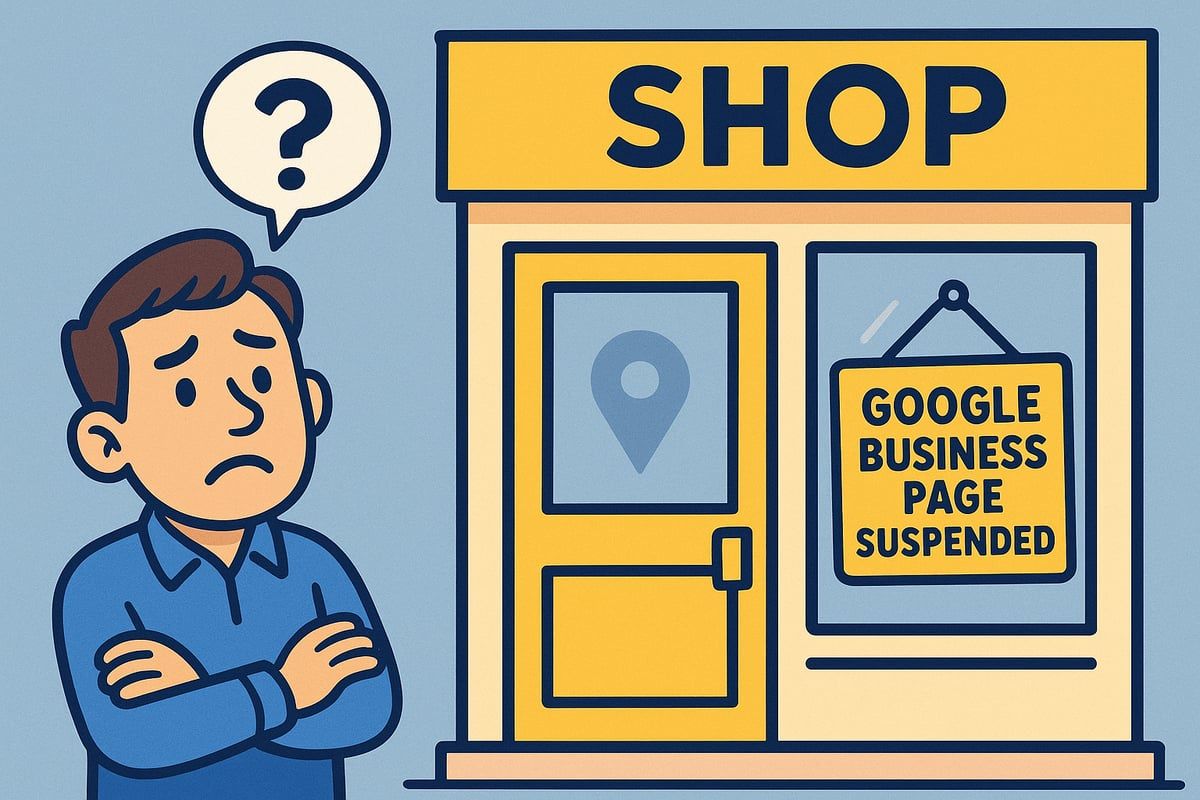
Common Reasons for Suspension
Google has updated its suspension policies for 2026, making it vital for businesses to keep up. The most common reasons for having your google business page suspended include:
- Inconsistent or fake business addresses
- Keyword stuffing in your business name or description
- Listing prohibited content or services
- Using virtual offices or fake locations
Verification requirements are now stricter, with more checks on documentation and business legitimacy. For example, in 2025, 37% of suspensions were linked to address inconsistencies according to BrightLocal. Service area businesses and online-only companies are particularly at risk.
Maintaining accurate, up-to-date business details is crucial. For a deeper dive into common triggers, you can review the Common causes of Google Business Page suspension to help avoid these pitfalls.
Types of Suspensions: Soft vs. Hard
Not all suspensions are the same. When your google business page suspended alert appears, it could be either a soft or hard suspension.
- Soft suspension: Your business listing stays visible, but you can’t manage or update the profile. Customers might still find you, but you lose control.
- Hard suspension: Your profile is completely removed from Google Search and Maps. This is more severe and often harder to resolve.
You can identify the type by checking your Google Business dashboard for specific notifications. Hard suspensions increased by 15% in 2025, making it even more important to understand the difference. Soft suspensions, though disruptive, are usually resolved faster with accurate information.
Immediate Effects on Your Business
A google business page suspended status can hit your business hard. The effects are often seen immediately:
- Loss of visibility on Google Maps and local Search
- Fewer calls, website visits, and walk-ins
- Drop in customer trust and fewer new reviews
For example, a local restaurant might see bookings fall by 50% overnight. If you run Google Ads or rely on integrations, those can also be affected, reducing your reach even further. The longer your listing is suspended, the harder it is to regain lost ground.
Google’s 2026 Suspension Policy Updates
In 2026, Google rolled out new suspension policies. If your
google business page suspended message appears, you’ll likely face updated requirements such as:
- Providing more detailed documentation and business identity proof
- Stricter enforcement for regulated industries like health and finance
- A mix of automated and manual suspension triggers
One major change is the new photo verification process, which asks for recent storefront, signage, or interior images. Compared to previous years, these updates are designed to weed out fake or misleading listings, making compliance more important than ever.
Myths and Misconceptions
There are plenty of myths about getting your google business page suspended. Let’s clear a few up:
- Myth: All suspensions are permanent.
Fact: Most can be appealed and reinstated with the right steps. - Myth: Reinstatement takes forever.
Fact: Many cases resolve within a week if you follow Google’s process. - Myth: You can’t appeal.
Fact: Appeals are possible, but you must address the real issue.
Some business owners mistakenly create new listings, which can make things worse. Always follow Google’s official guidelines to avoid common mistakes and speed up reinstatement.
Step-by-Step Guide: How to Restore Your Suspended Google Business Page
Finding your google business page suspended can feel overwhelming, but you are not alone. Many local businesses face this challenge each year. The good news is that with a clear plan, you can get your listing back online and reconnect with your customers. Let’s walk through the process together, step by step.
Step 1: Identify the Suspension Reason
When you see your google business page suspended, the first thing to do is pinpoint why. Log into your Google Business dashboard and look for notifications or warning banners. Google often sends an email outlining the suspension reason, so check your inbox and spam folder.
Common messages include “Suspended for quality issues” or “Address could not be verified.” These clues help you understand what triggered the problem. For example, if your address does not match public records, it could be an address inconsistency.
Take careful note of any error codes or details. The more you understand about why your google business page suspended, the better your chances for a quick fix.
Step 2: Audit and Correct Your Business Information
After identifying the cause, review every detail of your profile. Check your NAP (Name, Address, Phone) for consistency across Google and other platforms. Make sure there is no keyword stuffing in your business name or description, as this often leads to your google business page suspended.
Remove any prohibited categories or duplicate listings. For example, if you have mismatched suite numbers or variations of your address, correct them so everything matches official documents.
Always refer to Google’s business profile guidelines. Keeping your information clean and accurate helps prevent future issues and supports a smooth reinstatement.
Step 3: Gather Required Documentation
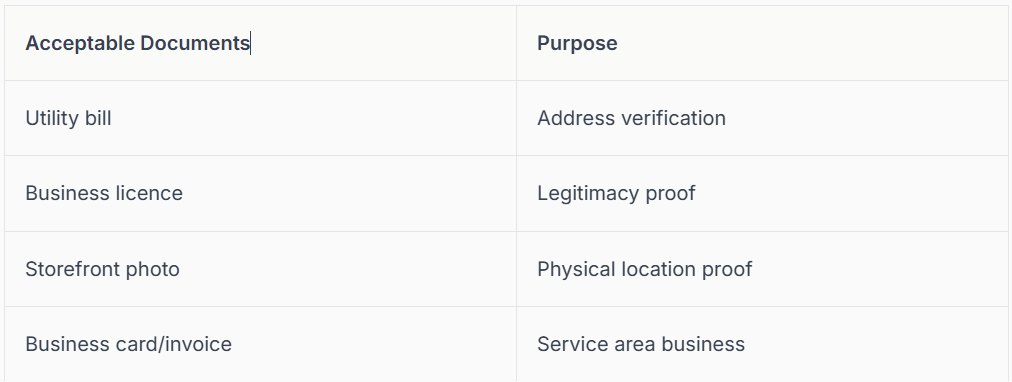
To reinstate a google business page suspended, you will need to provide proof of your business’s legitimacy. Acceptable documents include utility bills, business licences, and clear photos of your storefront, signage, and interior.
Digital-only businesses may need to show website ownership or relevant business documents. Make sure your photos are high-resolution and show both your business name and address.
A recent study found that 82% of reinstatements required photo evidence. Prepare all documents before submitting your request, as this speeds up the process and shows Google you are ready to comply.
Step 4: Submit a Reinstatement Request
Now you are ready to formally ask Google to restore your listing. Head to the
Google Business Profile reinstatement form through your dashboard. Write a concise, factual explanation of what happened, including any actions you have taken to correct the issue.
Attach all your supporting evidence, double-checking that everything is clear and accurate.
Here’s a sample response template:
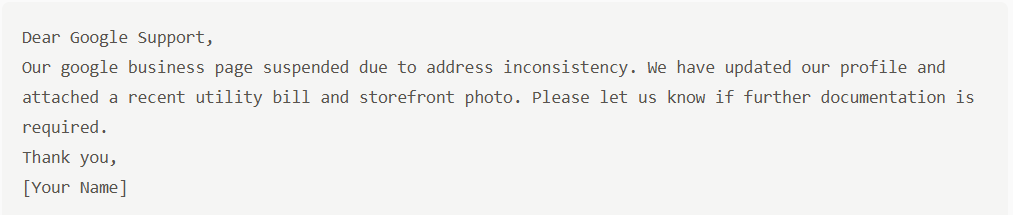
For more detailed help, see the Google Business Profile reinstatement guide. Response times are usually 3–7 business days in 2026.
Step 5: Monitor, Respond, and Escalate if Needed
After submitting your request, keep an eye on your Google dashboard for updates. If Google contacts you for more information, reply promptly and provide any extra documentation they request.
If you do not get a response within a week, or if your google business page suspended status does not change, consider escalating. Use the Google Business Profile Support channels or the Google Business Community forum for peer advice.
Be patient and avoid submitting multiple requests at once. Persistence and clear communication are key to resolving your suspension.
What to Do If Your Reinstatement Is Denied
If your reinstatement is denied, do not panic. Carefully read Google’s feedback to understand what was missed or incorrect. Fix any overlooked issues, update your documentation, and submit again.
In rare cases, you may be allowed to create a new listing, but only do this if Google specifically permits it. You can also appeal through Google’s support channels. Many businesses succeed after a second appeal, so do not give up.
Remember, the most important thing is to follow official guidelines and keep your information accurate. This way, you can turn a google business page suspended setback into a fresh start for your business.
Preventing Future Suspensions: Best Practices for 2026
Proactively safeguarding your Google Business Profile is the best way to avoid the stress of a google business page suspended scenario. Many businesses only realise the risk when it is too late, but with a few regular habits, you can keep your profile healthy and visible. Let’s look at the top strategies every business should follow in 2026.
Keeping Your Business Information Accurate
Consistency is crucial if you want to avoid a google business page suspended notice. Always double-check that your business name, address, and phone number (NAP) match across your website, social platforms, and directories.
- Update your opening hours, address, and contact details as soon as changes happen.
- Remove any extra keywords from your business name or descriptions.
- Review your service area or categories for accuracy.
For more practical advice on why suspensions happen and how to fix them, see this guide: Why your Google Business Profile got suspended.
By keeping your information up to date, you build trust with both Google and your customers.
Complying with Google’s Guidelines
Google updates its policies every year, so it is vital to stay current if you want to avoid having your google business page suspended. Review the latest 2026 guidelines, paying special attention to new verification methods and restricted content.
- Avoid using banned words or promoting regulated services unless you meet all requirements.
- Complete all new verification steps, such as photo or video verification.
- Check for updated documentation requests, especially if you work in health or finance.
Set a reminder to read Google’s policy updates every quarter. This way, you avoid surprises and keep your profile compliant.
Managing User Access and Ownership
One overlooked cause of a google business page suspended event is poor account management. Only grant access to trusted team members, and use two-factor authentication to secure your account.
- Remove access from former staff immediately.
- Audit user roles and permissions regularly.
- Keep a list of authorised managers and owners.
If you experience account issues, check your user list first. A well-managed team means fewer security risks and a smoother reinstatement process.
Monitoring for Suspicious Activity or Changes
Stay alert for unauthorised edits or suspicious changes, which can lead to a
google business page suspended situation. Google now offers notifications for profile edits, so enable these alerts.
- Watch for sudden changes to your business details or reviews.
- Report spam edits or fake reviews quickly through the dashboard.
- Use Google’s recommended security settings.
Being proactive helps you catch problems early and keeps your profile safe from malicious activity.
Regular Profile Audits and Professional Help
Schedule a profile audit every quarter to spot issues before they trigger a google business page suspended warning. A detailed check-up can uncover hidden problems, like outdated information or policy violations.
- Review your profile for accuracy and completeness.
- Consider working with a local SEO expert for extra peace of mind.
- Use checklists to ensure nothing is missed.
Regular audits and professional advice help your business stay resilient and visible, whatever changes Google introduces.
Expert Tips and Advanced Troubleshooting
Getting your google business page suspended can feel overwhelming, but expert know-how can make all the difference. Here are advanced tips and troubleshooting methods to help you get back online, stay compliant, and regain your customers’ trust.
Common Mistakes to Avoid During Reinstatement
When facing a google business page suspended notice, avoid the most common errors that slow down the reinstatement process. Many businesses submit blurry or incomplete documents, or forget to address the exact reason for suspension. Double-check all your evidence before uploading.
Do not resubmit the reinstatement form multiple times without making real changes, as this can delay your case. Always respond promptly to Google’s follow-up emails. For more detailed advice, explore
Troubleshooting Google Business Profile issues for step-by-step solutions.
Advanced Verification Techniques
Some google business page suspended cases require extra proof. In 2026, Google may ask for video verification or additional business records, such as invoices or branded vehicle photos. Service area businesses can use vehicle signage or uniform branding as supporting evidence.
If you get a 60-minute evidence submission request, act quickly and ensure your documents are clear. For more on the latest verification protocols, visit New reinstatement protocols for Google Business Profiles. Request a manual review if automated checks fail.
Navigating Complex Suspension Scenarios
Multi-location companies or those in regulated industries often see their google business page suspended for policy breaches. For franchises, ensure each address matches Google’s requirements exactly.
If your business operates across several sites, keep all documentation organised and accessible. For regulated fields like healthcare or finance, extra identity checks may apply. When challenges arise, coordinate with Google support and provide all requested information promptly.
Leveraging Google Support and Community Resources
If your google business page suspended appeal is taking longer than expected, tap into Google’s official resources. Use the Google Business Profile Help Centre for direct support and submit queries with all relevant details.
Engage with the Google Business Community forum, where peers and Product Experts share success stories and practical fixes. Don’t hesitate to escalate your case if you feel stuck. Staying informed and persistent often leads to faster resolution.
Why Verification Matters and How Connect SEO Can Help
A verified Google Business Profile is your ticket to visibility and customer trust. Without verification, your business is unlikely to appear on Maps or Search, and customers may choose competitors who seem more trustworthy.
At Connect SEO, we provide a professional verification service, helping you avoid the google business page suspended nightmare. Our team gets your business visible, verified, and compliant, so you can focus on what matters—serving your customers and growing your reputation.
The Impact of Google Business Page Suspensions on Local SEO and Revenue
Experiencing a google business page suspended event can be more than just a technical hiccup. It can feel like your business has suddenly vanished from the digital high street, leaving regulars and new customers alike unable to find you. Let's break down how these suspensions affect your visibility, revenue, and what you can do to bounce back stronger.
Loss of Local Search Visibility and Traffic
When a google business page suspended notice appears, your business can instantly disappear from Google Maps and Search results. This means fewer people discover your services, especially on mobile devices, where most local searches happen. For example, a local plumber might find their listing missing from the local pack, resulting in a dramatic drop in calls and enquiries. According to Moz, 60% of clicks go to the top three local results, so losing your spot can be devastating.
Having a suspended listing means competitors quickly take your place, and your business stops appearing in key searches. The Impact of Google Business Profile suspensions on local businesses shows just how much this can stall customer discovery and growth.
Revenue and Customer Trust Consequences
A google business page suspended status doesn't just affect your website traffic, it hits your bottom line too. New customer enquiries and bookings can dry up overnight, making it tough to maintain cash flow. For instance, a salon that relied on Google for bookings might see appointments drop by 40% after suspension.
Trust is another big casualty. Customers may lose confidence if they can't find your business online, or if your reviews vanish alongside your listing. Rebuilding your reputation takes time, especially if reviews are lost or hidden during the suspension. The longer your business stays suspended, the harder it is to regain customer trust and momentum.
Competitor Advantages and Market Share Loss
When your google business page suspended issue arises, competitors often seize the opportunity. With your listing out of the picture, rivals can attract your regulars and new leads. Imagine a rival capturing all the bookings that would have come to you, simply because they're still visible online.
BrightLocal reports that 28% of suspended businesses lose customers to competitors during suspension periods. This shift in market share can be tough to recover from, especially if the suspension drags on. Quick restoration is key to stopping this trend and regaining your local presence.
Building Long-Term Resilience in Local SEO
Recovering from a google business page suspension is only the first step. For lasting resilience, diversify your local marketing. Keep your Google Business Profile up to date, and encourage happy customers to leave reviews once your listing is restored.
Engage with your community through social media and local directories, so you're not solely reliant on Google for visibility. Regularly audit your business information and stay informed on Google’s latest policies. This proactive approach can help you weather future storms and keep your business thriving, no matter what changes come your way.
We understand just how stressful it is when your Google Business Page gets suspended and suddenly your customers can’t find you online. You’re not alone—this guide has walked you through every step to restore your listing, keep it safe in 2026, and make sure your hard work pays off. If you’d like a helping hand from real UK-based experts who know both your trade and the ins and outs of Google, we’re here for you. Let’s get your business back where it belongs—right at the top, visible and trusted.
Contact connect SEO Today
We’re ready to support you every step of the way.











