
Google Business Profile Verification Guide for 2026 Success
Struggling to get your business seen on Google in 2026? You are not alone. Google business profile verification is your gateway to local search dominance.
With a verified profile, you unlock more leads, higher rankings, and customer trust. This guide gives you actionable steps to master google business profile verification for long-term local SEO success.
We will explain what verification is, why it matters, step-by-step methods, troubleshooting, and optimisation tips for 2026. Ready to stand out? Let Connect SEO guide your Google Business Profile verification journey for hassle-free results.
What is Google Business Profile Verification and Why Is It Essential in 2026?
Getting your business noticed online is tougher than ever. In 2026, google business profile verification is the cornerstone of local visibility. Let’s break down why this process matters so much and how it shapes your success.
The Evolution of Google Business Profiles
Google Business Profiles have changed dramatically over the years. Back in the early days, simple listings just showed your address and phone number. Fast forward to 2026, and the platform has become the foundation for local search, maps, and even voice assistant queries.
Mobile and voice search have made instant, accurate information a must. Now, google business profile verification is more than a formality—it’s your ticket to visibility on maps and search results. Features like messaging, posts, and reviews have turned GBP into a central hub for customer interaction.
With these advancements, it’s never been more important to ensure your business is verified, accurate, and up to date. Need expert guidance? Connect SEO’s team can help you stay ahead.
The Purpose of Verification
So, why does google business profile verification matter so much? It’s how you prove to Google—and your customers—that your business is real, trustworthy, and managed by the right people.
Verification stops fake listings and helps Google weed out spam. Only verified owners can access advanced features, like analytics and messaging. Without it, your business might never unlock its full potential on Google.
For peace of mind and a smooth process, many local businesses turn to Connect SEO for help with their verification journey.
Benefits of a Verified Profile
The impact of Google Business Profile verification is huge for local businesses. Verified profiles get priority in local search and Google Maps, so you appear right where customers are searching.
Customers trust verified businesses more, boosting clicks and in-person visits. In fact, businesses with verified profiles see up to 70% more in-person visits, according to Google Business Profile verification statistics 2025. Plus, you gain access to reviews, Q&A, posts, and messaging—features that help you stand out.
Want to unlock all these benefits quickly? Connect SEO offers a complete, hassle-free verification service to get you noticed faster.
Risks of Skipping Verification
Skipping google business profile verification can leave your business exposed. Unverified profiles are more likely to be hijacked or filled with incorrect information, leading to confusion and lost customers.
You’ll also miss out on key features and see reduced visibility in search results. Imagine a customer finding the wrong opening times or address—chances are, they’ll go elsewhere.
Don’t let these risks hold you back. Connect SEO can help secure your profile and protect your reputation.
2026 Trends Impacting Verification
Looking ahead, google business profile verification is only getting more important. Google has introduced stricter requirements to fight digital fraud and ensure business data is accurate for AI-driven search.
Expect more emphasis on security, regular updates, and profile management in 2026. Businesses that prioritise verification and ongoing optimisation will stay ahead of competitors and keep their customers’ trust.
Ready to future-proof your local presence? Reach out to Connect SEO for expert support with every step of your google business profile verification and optimisation.
Preparing for Google Business Profile Verification: What You Need Before You Start
Getting ready for google business profile verification is the foundation to unlocking your business’s visibility and credibility in local search. A smooth verification process starts with proper preparation. Let’s walk through what you’ll need before you even hit the submit button. If you want a hassle-free experience, remember that Connect SEO’s experts are ready to help at every step.
Essential Pre-Verification Checklist
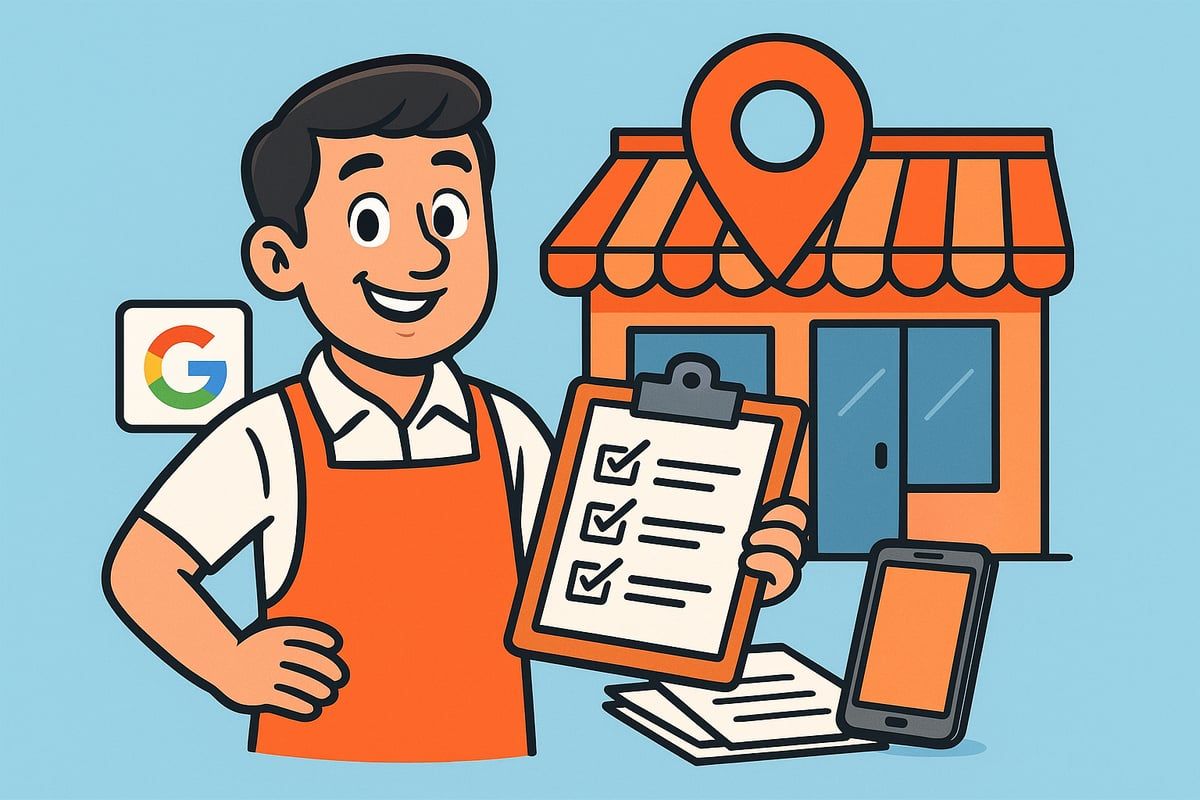
Before you begin google business profile verification, confirm your business is eligible. Does your company have a physical location or a defined service area? Google requires this as a baseline.
Next, gather accurate details: business name, address, phone number (NAP), website, operating hours, and the correct business category. Make sure your NAP is consistent everywhere online – your website, directories, and social media should all match. Inconsistencies can slow down or even derail the process.
Taking these steps upfront can save you frustration later. If you need support, Connect SEO can help you check your eligibility and prepare your information so nothing is missed.
Understanding Google’s Guidelines
Reviewing Google’s latest business representation policies is key for successful google business profile verification. Google wants to ensure only legitimate, real-world businesses gain access to local search features.
Avoid common mistakes that cause delays or denials. For example, using PO boxes or virtual offices as your business address often leads to failed verification. Double-check that your business name matches your signage and that all details are up to date.
If you’re unsure about the guidelines, Connect SEO can clarify requirements and help you avoid missteps. For more details about frequent issues and solutions, see the Complete Google Business Profile troubleshooting guide.
Claiming or Creating Your Profile
The next step in google business profile verification is to see if your business is already listed on Google. Search for your business name in Google Maps or Search. If a listing exists, claim it using an official business email and an owner-level Google account.
If your business isn’t there, you’ll need to create a new profile from scratch. Use contact details that match your real-world information. Using a personal email or a generic account can cause access issues later.
Not sure which route to take? Connect SEO’s team can handle the claiming or creation process for you, ensuring you have full control and the right access from day one.
Preparing Supporting Documents
Google may request supporting documents during google business profile verification. Common examples include utility bills, business licences, or clear photos of your storefront and signage. These prove your business’s legitimacy and physical presence.
Make sure documents are current, match your business name and address, and are easy to read. If you’re in a regulated industry, you might need to provide extra paperwork, such as certifications or permits.
Having everything ready speeds up verification. Connect SEO can review your documents before submission, helping you meet Google’s criteria and avoid unnecessary delays.
Step-by-Step Guide: How to Verify Your Google Business Profile in 2026
Verifying your business on Google is a crucial step for local visibility and customer trust. With google business profile verification, you unlock powerful features and secure your spot in local search results. Let’s walk through the updated process for 2026, so you can get verified with confidence. If you want expert help at any stage, Connect SEO is here to support you.
Step 1: Sign in and Access Your GBP Dashboard
Start by logging into your Google account. Use an official business email for best results. Head to the Google Business Profile Manager and select the business you want to verify.
If you manage multiple locations, make sure you pick the correct one. This step is vital for accurate google business profile verification, as mistakes here can cause delays later.
Can’t find your business? Double-check spelling or try searching with your business address. For new businesses, you may need to create a profile before starting verification.
If you’re unsure whether your business already has a listing, search on Google Maps. Claimed profiles will display an “Own this business?” option if unclaimed. Always ensure you have owner-level access before proceeding.
Need help navigating the dashboard? Connect SEO can guide you through the setup and ensure you’re starting on the right foot.
Step 2: Choose the Appropriate Verification Method
Google offers several methods for google business profile verification in 2026. The available options depend on your business type, history, and location. Common methods include postcard, phone, email, video, instant, and bulk verification.
Use the table below to compare your options:
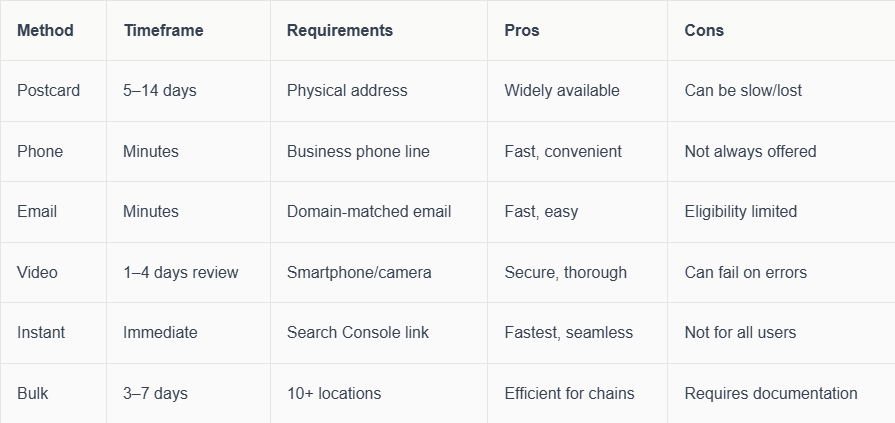
Choose the method that fits your situation. If you’re unsure, Connect SEO can recommend the best path for your business.
Step 3: Completing Verification by Postcard
Postcard verification remains a popular choice, especially for businesses with a physical location. Begin your google business profile verification by requesting a postcard from your dashboard.
Make sure your address is correct, including suite or unit numbers. Google will send a postcard with a unique code. Once it arrives, enter the code in your GBP dashboard.
If the postcard doesn’t arrive within two weeks, you can request a new one. Double-check your address for typos or missing details. Avoid requesting too many postcards, as this can cause complications.
Postcard verification can feel old-fashioned, but it remains reliable for most local businesses. If you face repeated issues, Connect SEO can help troubleshoot and manage your verification process.
Step 4: Verifying by Phone or Email
Some businesses are eligible for phone or email verification, which can speed up your google business profile verification. If you see these options, select your preferred method.
For phone verification, Google will call or text a code to your listed business number. Enter the code promptly in your dashboard.
Email verification requires a domain-matched email address. Google sends a code to your inbox, which you then enter to complete the process. Ensure your business information matches exactly, as discrepancies can block these fast-track options.
If you don’t see phone or email as options, don’t worry. Eligibility is determined by Google’s algorithms and your business’s trust signals. Need help unlocking these methods? Connect SEO can advise on how to build your profile’s credibility.
Step 5: Video Verification Process
In 2026, video verification is increasingly common, especially for new or high-risk businesses. This secure method helps Google confirm your business’s legitimacy.
To start, choose video verification in your dashboard. You’ll be prompted to record a short video showing your storefront, signage, interior, and proof of business operations. Make sure to clearly display your business name, address, and any equipment or staff.
Upload the video following Google’s instructions. Reviews usually take 1–4 days. For tips on success, avoid blurry footage and ensure all requested details are visible. If you’re struggling, check out Why Google Business Profile video verification fails for common pitfalls.
Video verification can be daunting, but Connect SEO’s team has helped countless UK businesses get it right the first time.
Step 6: Bulk and Instant Verification (for Multi-location Businesses)
If you operate 10 or more locations under the same ownership, bulk google business profile verification can save you time. Start by gathering documentation proving your authority over all sites, such as utility bills or business licences.
Submit your request through the GBP dashboard, following Google’s prompts. Bulk verification generally takes 3–7 days. Keep your records organised to avoid delays.
Instant verification is available to some businesses already verified in Google Search Console. If eligible, you’ll see this option in your dashboard. Simply confirm your details to complete the process in minutes.
Managing multiple locations can be complex, but Connect SEO offers tailored solutions for chains and franchises.
Step 7: Confirming Verification Status and Next Steps
After completing your chosen google business profile verification method, check your dashboard for status updates. Verified profiles display a “Verified” badge.
If your verification is pending, monitor your email for updates. Sometimes, Google may request additional information or documents. If your request is denied, carefully review Google’s feedback and correct any errors.
Once verified, celebrate! You now have access to powerful tools like reviews, posts, and insights. For ongoing optimisation and updates, Connect SEO offers comprehensive GBP management services to keep your profile performing at its best.
Troubleshooting Common Verification Issues
Even with careful steps, google business profile verification can hit snags. Common issues include:
- Not receiving your verification code (postcard, phone, or email)
- Mismatched business information
- Denied or suspended profiles
To resolve these, double-check all details for accuracy. If your code doesn’t arrive, request a new one after the recommended wait time. For denied profiles, review Google’s feedback and resubmit with correct information.
If your profile is suspended, follow Google’s reinstatement process. For more help, Connect SEO can step in to resolve tricky cases and prevent future problems.
Stuck at any stage? Don’t let verification delays hold you back—Connect SEO’s experts can manage the entire process for you, ensuring your local presence is verified, secure, and ready to grow.
Post-Verification: Optimising Your Google Business Profile for Maximum Visibility
Congratulations on completing your google business profile verification! Now comes the exciting part, optimising your profile to attract more local customers, boost your rankings, and make your business shine. In 2026, it's not just about being verified, but about keeping your profile fresh, detailed, and engaging. Let's explore the key steps to ensure your profile stands out and delivers real results.
Completing Your Profile for 2026 Standards
Once your google business profile verification is complete, it is time to fill in every detail. Add high-quality photos of your business, both inside and out. These visuals build trust and give customers a real sense of what to expect.
Write a clear, inviting business description. Highlight what makes you unique, your services, and any special touches. Update your business hours regularly, including holiday and special event times. Do not forget to include your website, phone number, and accurate address.
List all your services and products. The more complete your profile, the more likely Google’s AI will match you with local searchers. If you offer special amenities, like wheelchair access or online appointments, make sure to include those as well.
Leveraging New GBP Features
With google business profile verification, you unlock access to powerful features that help you connect with your community. Use posts to share offers, events, and news. These updates appear right in search and maps, keeping your audience engaged.
Turn on messaging, so customers can reach you instantly. Responding quickly shows you value their time and builds trust. Make the most of the Q&A section by answering common questions clearly and proactively.
Encourage customers to leave reviews and always reply, whether the feedback is positive or negative. Your responses show you care and help build a strong reputation. Remember, a lively, interactive profile attracts more attention and encourages people to choose your business.
Advanced Optimisation for Local SEO
After google business profile verification, advanced optimisation can set you apart from competitors. Choose the most accurate business categories and add all relevant attributes, such as payment options or languages spoken.
If you serve multiple locations or areas, add them to your profile. This widens your reach and ensures you appear for local searches in those areas. Use detailed service lists and descriptions to help Google match your business with specific customer needs.
Research shows businesses with optimised profiles get up to 5 times more calls and direction requests. Invest the time to keep every detail up to date. If you need expert advice, Connect SEO is here to help you maximise your local SEO impact and stay ahead of the competition.
Monitoring and Maintaining Your Profile
Ongoing maintenance is essential after google business profile verification. Set up notifications for new reviews, questions, or suggested edits. This way, you can respond quickly and keep your information accurate.
Schedule regular audits of your profile. Check that your name, address, phone number, and business hours are always current. Use Google Insights to track customer actions and see what is working best.
If managing your profile feels overwhelming, consider Google Business Profile management services from Connect SEO. Our UK-based team handles everything, from updates to optimisation, so you can focus on running your business while we boost your local visibility.
Security and Ongoing Profile Management
Protect your google business profile verification by assigning user roles carefully. Only grant access to trusted team members and regularly review permissions. Watch for any suspicious activity or unauthorised changes.
To prevent profile hijacking, use strong passwords and enable two-factor authentication for your Google account. Document any changes you make and keep backup copies of important business documents.
Remember, ongoing management is key to long-term success. Connect SEO offers continuous support and optimisation, so you never have to worry about falling behind. Let us help you stay secure, visible, and thriving in 2026 and beyond.
The Impact of Verification on Local SEO and Business Growth in 2026
Struggling to boost your business’s presence in local searches? Understanding the impact of google business profile verification is the game-changer many overlook. In 2026, the difference between verified and unverified profiles is starker than ever, shaping not just your rankings but your entire business growth strategy.
Verification as a Local SEO Ranking Factor
Google business profile verification is now a foundational local SEO ranking factor. Google prioritises verified businesses in Maps and local search results, making verification essential for visibility. When your profile is verified, Google knows you are legitimate, which strengthens your authority in the eyes of both search engines and customers.
Without verification, your business may not appear in competitive map packs or voice search results. As AI-driven search grows, Google’s algorithms increasingly reward profiles that are verified, accurate, and regularly updated. Connect SEO offers tailored support to help you secure this crucial verification, ensuring you never miss out on local opportunities.
Real-World Results: Verified vs. Unverified Businesses
The numbers don’t lie. Verified businesses receive up to 50% more in-person visits and significantly higher engagement across calls, website clicks, and direction requests. According to Local SEO statistics in the U.S. 2025, local businesses with google business profile verification enjoy stronger customer trust and higher conversion rates.
Imagine two shops on the same street: one with a verified profile and glowing reviews, the other still unverified. The verified business is far more likely to attract footfall and repeat customers. If you want to see similar growth, let Connect SEO guide your verification journey for measurable results.
Integration with Other Google Services
Google business profile verification doesn’t just help your Maps ranking. It unlocks seamless integration with Google Ads, Analytics, and Search Console, giving you a unified toolkit for local marketing. By linking your verified profile with these services, you gain deeper insights into customer behaviour, campaign effectiveness, and search performance.
This interconnected approach makes it easier to manage your digital presence and refine your strategies. If you’re looking to harness the full power of Google’s ecosystem, Connect SEO can help set up, verify, and optimise your profile, so you benefit from every available feature.
Adapting to 2026 Local Search Trends
Local search is evolving rapidly, with AI and voice assistants setting new standards for business data accuracy. Google business profile verification ensures your information is trusted by these systems, increasing your chances of being recommended in voice search results or AI-curated lists.
To stay ahead, keep your profile updated with detailed descriptions, current hours, and engaging posts. Verified profiles are more likely to be featured in “near me” searches and smart device recommendations. Want to future-proof your local strategy? Connect SEO’s ongoing optimisation services are designed to keep your business at the forefront of new trends.
Common Pitfalls and How to Avoid Them
Many businesses make the mistake of thinking verification is a one-and-done task. However, failing to maintain your profile, update details, or manage user access can lead to suspensions or lost visibility. Learn about the most common causes of GBP suspension to safeguard your investment in google business profile verification.
Avoid these pitfalls by reviewing your profile regularly, responding to reviews, and updating information promptly. If you ever feel overwhelmed, Connect SEO is here to provide expert guidance, support, and peace of mind, ensuring your business remains visible and trusted.
Frequently Asked Questions about Google Business Profile Verification
Navigating google business profile verification in 2026 can feel overwhelming, but you are not alone. Below, we answer the most common questions to help you secure, manage, and optimise your business listing with confidence. Remember, Connect SEO is here to support you every step of the way.
What types of businesses are eligible for Google Business Profile verification in 2026?
Businesses with a physical location customers can visit, or those who travel to customers within a service area, are eligible for google business profile verification. Online-only businesses are not eligible. If you need help determining your eligibility, check Google's latest guidelines or reach out to Connect SEO for expert advice.
How long does verification take for each method?
Verification timeframes depend on the method chosen. Here is a quick comparison:
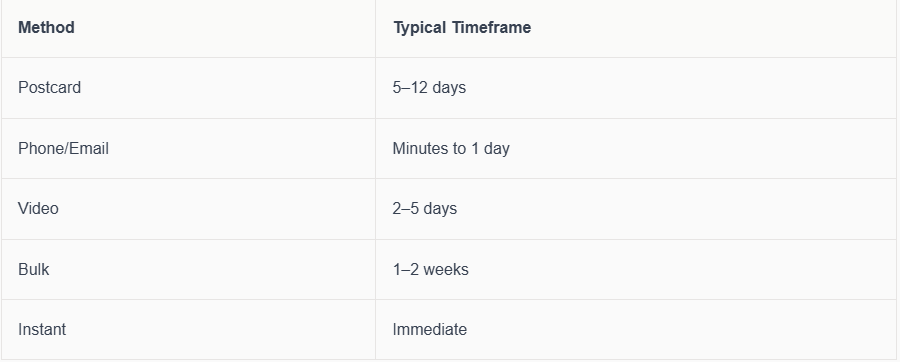
For detailed steps on each method, see this Google Business Profile verification methods 2025 guide. Connect SEO can help you choose the fastest, most reliable option for your business.
What should I do if my verification code doesn’t arrive?
First, double-check your address for accuracy. Sometimes, small errors can cause delays. Wait at least 14 days for postal codes. If there is still no code, use the "Request another code" option or contact Google support. Connect SEO can assist if you are stuck or need a faster resolution.
Can I verify more than one location at a time?
Yes, google business profile verification supports multi-location businesses. If you manage 10 or more locations under the same ownership, you may qualify for bulk verification. This process streamlines verification and saves valuable time for fast-growing businesses.
What documents does Google require for verification?
You may need to provide documents such as utility bills, business licences, or photos showing your signage and premises. Requirements vary based on your business type and location. For regulated industries, extra documentation may be needed. Connect SEO can guide you through gathering the right paperwork.
How do I fix a suspended or denied profile?
Suspensions often happen due to policy violations, inconsistent information, or unauthorised changes. Review Google's suspension notice for clues. Update your details, provide requested documents, and submit a reinstatement request. If you are unsure, Connect SEO’s specialists can help get your profile back online quickly.
Is it possible to transfer ownership of a verified GBP?
Yes, you can transfer ownership by adding a new owner in your GBP dashboard, then assigning them primary status. Always ensure you trust the new owner and remove access from anyone who no longer needs it. Connect SEO can advise on safe transfer procedures.
What are the most common reasons for verification failure?
Common causes include mismatched business information, unsupported addresses, or missing documentation. Following the official Google Business Profile verification methods 2025 helps avoid these pitfalls. Connect SEO can review your application before you submit to prevent delays.
How does profile verification impact my Google Ads performance?
Verified profiles appear more credible, which can improve ad performance and click-through rates. Google often prefers verified businesses for location-based ad extensions, increasing your visibility and trust with potential customers.
Where can I get professional help with GBP verification and optimisation?
Connect SEO offers hands-on support for google business profile verification, profile optimisation, and ongoing management. If you want to save time and avoid stress, contact us for a free consultation. For a visual walkthrough, you can also watch this
Google Business Profile setup tutorial 2024.
We’ve covered a lot about why Google Business Profile verification is so important for your local success in 2026—from boosting your visibility in Maps to earning customer trust and staying ahead of the latest trends. If all this feels overwhelming or you simply want to make sure your business is set up right from the start, you’re not alone. We’re here to guide you every step of the way, drawing on real experience and a genuine understanding of what local businesses need. Let’s make your Google presence work harder for you—Contact connect SEO Today and let’s get your profile verified, optimised, and ready for growth.











